Contact Info
118 ALJUNIED AVENUE 2, SINGAPORE (380118)
support@cheapforexvps.com
Recommended Services


Supported Scripts
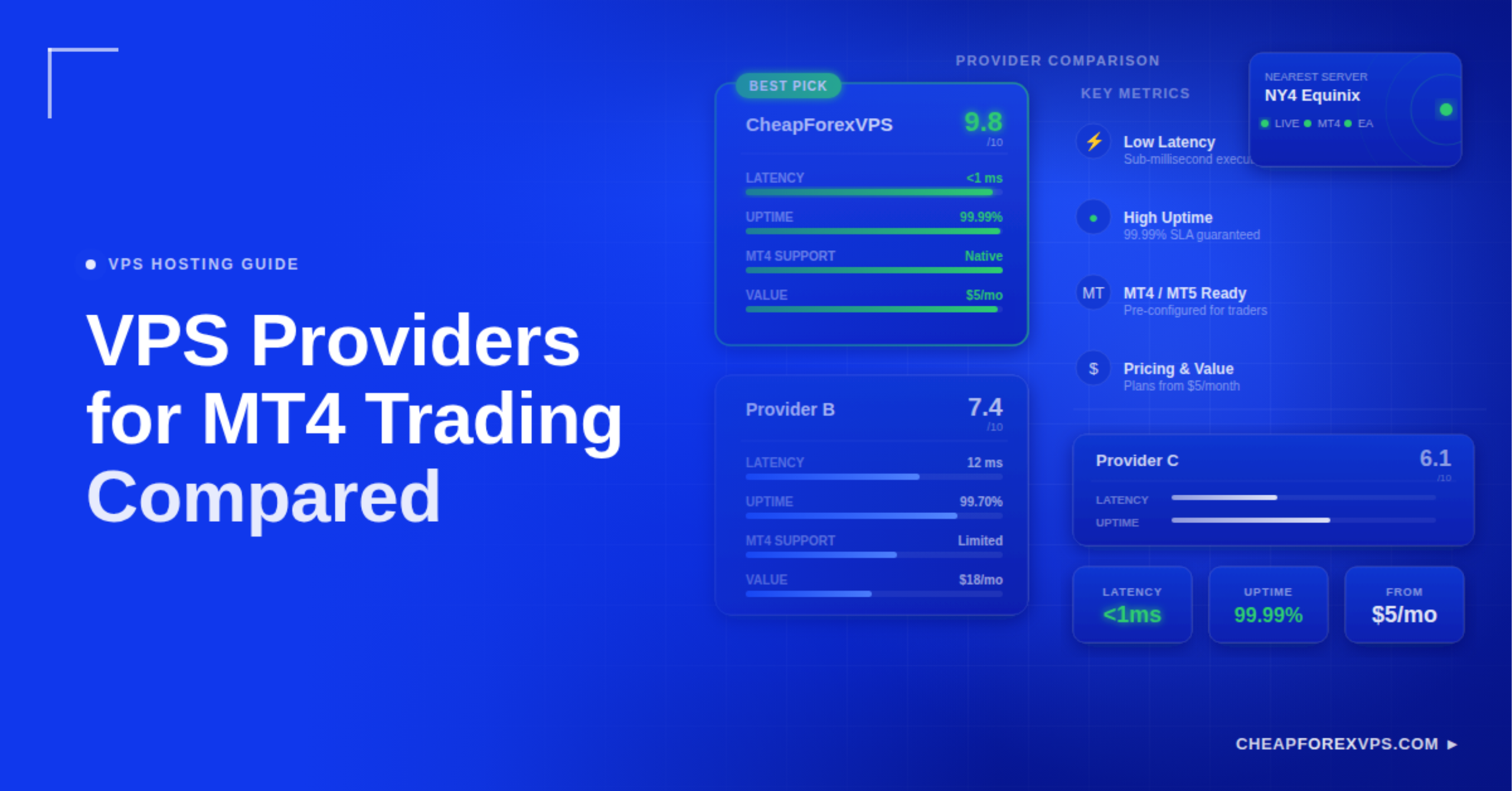
Every millisecond matters in forex trading. When your MetaTrader 4 platform runs on a home computer or a generic cloud server far from your broker, you lose execution speed on every order. Comparing VPS providers for MT4 trading means evaluating specialized hosting services on latency, uptime, hardware, and cost to find the server environment that keeps your trades executing without delay.
Not all VPS providers are built for trading. General-purpose cloud platforms require manual configuration, cost more for Windows Server instances, and are not co-located at the financial data centers where most retail brokers operate. A dedicated Forex VPS runs a preconfigured Windows Server environment with direct fiber connections to your broker’s infrastructure.
This guide covers the five factors that separate reliable MT4 VPS providers from underperforming ones, how to read latency benchmarks, and what hardware specifications your setup actually needs.
Why Does Latency Matter More Than Any Other VPS Metric?
Latency is the time it takes for your trade order to travel from your MT4 platform to your broker’s server and return with a fill confirmation.
A VPS in the same data center as your broker can achieve sub-1ms round-trip execution. A home computer over a standard internet connection typically adds 20ms to 150ms of delay. That gap translates directly to slippage: entering at a price 3 to 10 pips away from your target during fast-moving markets.
According to the 2022 Triennial Survey by the Bank for International Settlements (BIS), the forex market processes $7.5 trillion in daily volume. At that scale, a 5ms execution advantage can materially affect profitability over hundreds of trades per month.
|
Latency Range |
Connection Type | Execution Impact |
|
Under 1ms |
Same data center co-location | Near-instant fills, minimal slippage |
|
1ms to 5ms |
Same city, optimized fiber |
Reliable for most EA strategies |
| 5ms to 20ms | Regional connection |
Acceptable for longer-timeframe trading |
| 20ms or above | Generic cloud or home setup |
High slippage risk during volatility |
How Do You Compare VPS Providers for MT4 Trading?
Evaluate every provider across five pillars: location, hardware, uptime, testability, and support.
Providers make wide-ranging marketing claims that are difficult to verify without a structured approach. The five pillars below let you compare them on verifiable facts rather than promotional language.
Are the Data Center Locations Close to Your Broker?
Physical proximity to your broker’s trade server is the single most important factor in selecting a Forex VPS.
The majority of global forex trading traffic flows through three Equinix financial hubs: NY4 in New York, LD4 in London, and TY3 in Tokyo. Providers with servers inside those buildings can offer direct cross-connects to co-located brokers, achieving sub-1ms latency. A VPS based in a different city or region cannot replicate that performance regardless of network quality.
Before signing up, contact your broker’s support team to confirm which data center hosts their trade servers. Then verify that the VPS provider has a physical presence in that same facility.
What Hardware Does MT4 Actually Require?
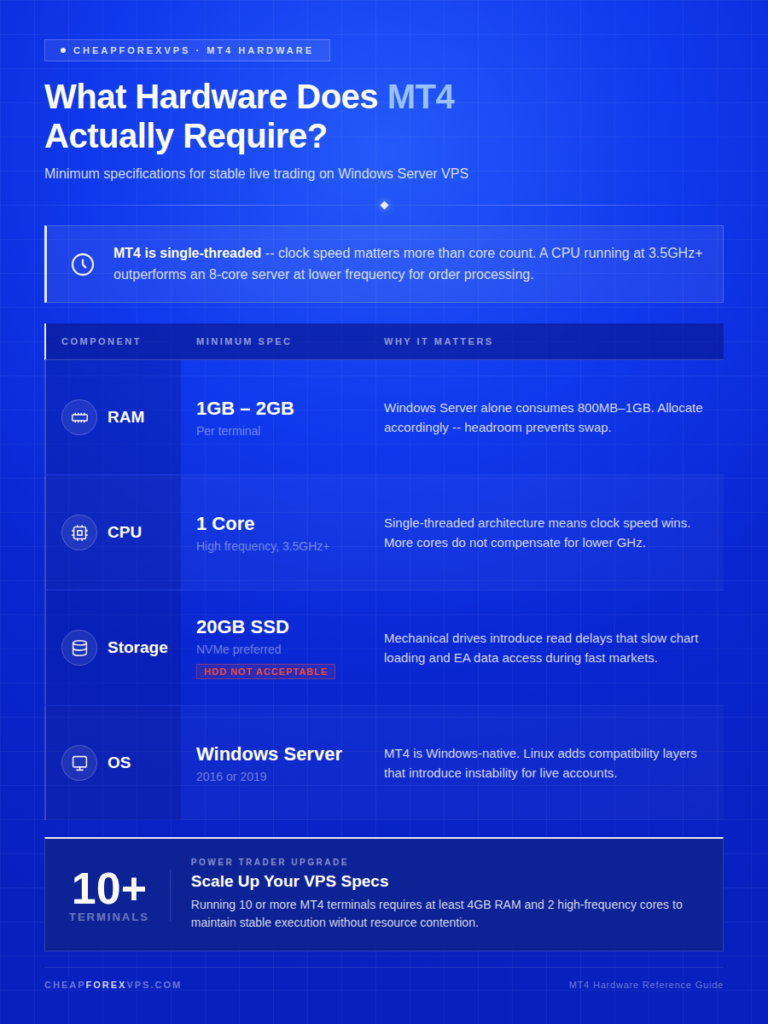
MT4 is a single-threaded application, so processor clock speed is more important than core count.
A high-frequency CPU running at 3.5GHz or above outperforms a low-frequency 8-core server for MT4 order processing. SSD storage is mandatory. Mechanical drives introduce read delays that slow chart loading and EA data access during high-speed market conditions.
|
Component |
Minimum for 1 Terminal | Notes |
|
RAM |
1GB to 2GB | Windows Server uses 800MB to 1GB alone |
|
CPU |
1 core, high frequency |
Clock speed over core count |
| Storage | 20GB SSD |
HDD is not acceptable for live trading |
| OS | Windows Server 2016 or 2019 |
MT4 is Windows-native; Linux adds instability |
Traders running 10 or more terminals should upgrade to at least 4GB RAM and 2 high-frequency cores.
What Uptime Guarantee Should You Require?
Require a minimum 99.95% uptime guarantee. Anything below that represents a measurable risk to live trading.
A 99.9% uptime guarantee allows up to 43 minutes of downtime per month. For a live EA holding positions through an overnight session, 43 minutes offline means missed stop-losses and uncontrolled drawdown exposure. Research from ITIC found that a single hour of unplanned downtime costs businesses an average of $300,000. For retail traders, the equivalent loss is measured in adverse fills and unclosed positions at unfavorable prices.
Providers that guarantee 99.95% or higher reduce the allowable downtime window to under 22 minutes per month.
How Do You Test a VPS Before Committing?
Run three independent tests during the trial period: a ping test, MT4 Journal review, and resource monitoring.
These tests take under 30 minutes and provide actual execution data rather than vendor-supplied benchmarks.
- Ping test: From the VPS terminal, ping your broker’s trade server IP over 100 samples. Record consistency, not just average speed.
- MT4 Journal tab: The Journal logs each order with a millisecond timestamp. Use it to verify actual execution latency under your live EA setup.
- Resource Monitor: Run your full EA stack during the London open. Sustained CPU spikes above 90% indicate an oversold server.
Tools like Beeks Group’s Latency Map provide independent benchmarks for major data center hubs that you can use to cross-reference provider claims.
What Level of Support Should a Forex VPS Provider Offer?
Forex markets operate 24 hours a day, 5 days a week. Your VPS support team must match that schedule.
A provider with business-hours-only support cannot resolve a server issue that occurs during the Asian session at 2:00 AM. Technical problems on a live trading server require resolution in minutes. Look for providers that offer live chat or a ticketing system with guaranteed response times around the clock.
Support depth also matters. General cloud providers offer infrastructure-level assistance only. Specialized Forex VPS providers understand MT4 configuration, EA compatibility, and broker connectivity, reducing resolution time significantly when real problems arise.
Why Do Specialized Forex VPS Providers Outperform General Cloud?
Specialized Forex VPS providers are purpose-built for MT4. General cloud platforms are not.
AWS, Azure, and comparable services serve thousands of application types. Their Windows Server instances require manual setup and cost $50 or above per month for a configured environment. They are not co-located by default at Equinix financial hubs.
A specialized Forex VPS provider has pre-negotiated cross-connects at NY4, LD4, TY3, and Singapore, pre-installs MT4 templates, and prices plans around the actual hardware requirements of trading platforms.
According to Grand View Research, the algorithmic trading market is growing at a compound annual growth rate (CAGR) of 10.5% through 2030. As EA adoption accelerates, the demand for purpose-built trading infrastructure is expanding beyond what generic cloud platforms were designed to support.
|
Feature |
Specialized Forex VPS | General Cloud (AWS/Azure) | Cheap Shared Hosting |
|
MT4 Preconfigured |
Yes | No, manual setup required | No |
|
Latency to Brokers |
Sub-1ms to sub-5ms | 10ms to 50ms variable | 50ms and above |
|
Monthly Pricing |
$5 to $30 | $50 and above for Windows |
$2 to $5 |
| Support Type | Trading-specific knowledge | General IT only |
Minimal |
| Uptime Guarantee | 99.95% to 100% | 99.99% infrastructure only |
99.0% |
| Windows License Included | Yes | Often a separate cost |
No |
What Mistakes Should You Avoid When Choosing an MT4 VPS?
The most common mistake is choosing a provider based on the lowest price without checking server density or data center location.
Budget hosting providers oversell server capacity. When too many users share the same physical hardware, CPU contention slows order processing during peak volatility. This is called “noisy neighbor syndrome,” and it is invisible in any marketing material.
Common selection mistakes to avoid:
- Choosing based on price alone without verifying server density or data center location
- Failing to confirm whether the Windows Server license is included in the quoted price
- Selecting a VPS in a different region from your broker’s trade server
- Relying on free broker-provided VPS plans as a primary trading environment
- Skipping performance testing before the refund window closes
A location mismatch is the most damaging ongoing error. If your broker operates in London and your VPS is in Singapore, you are adding approximately 150ms of latency to every single order. Equinix data confirms that the majority of global financial trading flows through a small number of primary hubs. Matching your VPS to the correct hub eliminates that overhead entirely.
What Should You Look for in Pricing and Guarantees?
A reliable Forex VPS should cost between $5 and $30 per month and include Windows licensing, a defined uptime guarantee, and a risk-free trial period.
A 5-day money-back guarantee gives you enough time to run ping tests, validate MT4 execution through the Journal tab, and evaluate support responsiveness before committing to a full billing cycle. Providers that offer no trial period cannot be verified against their own performance claims.
According to Trustpilot trend data, “Customer Service” and “Server Stability” are the two most cited factors in positive reviews for hosting providers. A structured trial period lets you evaluate both on a live trading setup before paying.
|
Factor to Verify |
Why It Matters |
|
Windows Server license included |
Hidden licensing adds $10 to $20 to base pricing |
|
Data center hub matches broker |
Location mismatch adds 50ms to 150ms latency per order |
| Uptime guarantee at 99.95% or above |
99.9% allows 43 minutes of downtime per month |
| 5-day or longer refund period |
Lets you test execution before committing to a billing cycle |
| 24/7 support with fast response times |
Live trading issues cannot wait until business hours |
How to Choose the Right MT4 VPS: Key Takeaways
Selecting an MT4 VPS comes down to three decisions: data center location, hardware quality, and provider specialization. A server that delivers sub-5ms latency to your broker, runs on SSD with a high-frequency CPU, and is backed by 99.95% uptime removes the infrastructure variables that cause avoidable trading losses.
The evaluation framework in this guide is repeatable. Identify your broker’s data center, run the three performance tests during the trial period, and confirm that Windows licensing and 24/7 support are included in the plan price.
Use this checklist before finalizing any provider:
- Confirmed broker data center location (NY4, LD4, TY3, or Singapore)
- VPS provider physically present in the same Equinix facility
- SSD storage and high-frequency CPU in the plan specifications
- 99.95% or higher uptime guarantee stated in the service agreement
- Windows Server license included in the monthly price
- 5-day or longer money-back guarantee available
- 24/7 support with trading-platform knowledge confirmed
CheapForexVPS offers plans starting at $5 a month with a 5-day money-back guarantee, Equinix-connected servers at NY4, LD4, TY3, and Singapore, and a 99.95% uptime guarantee backed by 7 years of specialized trading infrastructure. Compare plans and test performance risk-free at CheapForexVPS.
Frequently Asked Questions About MT4 VPS Providers
What is the best location for a Forex VPS?
The best location matches your broker’s trade server data center. For most retail brokers, that means Equinix NY4 in New York, LD4 in London, or TY3 in Tokyo. Contact your broker’s support team to confirm which facility they use before selecting a VPS plan.
Can I run multiple MT4 accounts on one VPS?
Yes. Allow an additional 512MB of RAM for each MT4 terminal you open. A 2GB to 4GB RAM plan supports 3 to 6 terminals reliably without CPU contention.
Is a free VPS worth it for MT4 trading?
Free VPS plans typically run on shared infrastructure with higher latency and unpredictable restart schedules. They can work as a backup option, but they are not suitable as a primary environment for live EA trading.
What is the difference between a VPS and a VPN?
A VPS is a remote computer that runs your MT4 platform continuously, 24 hours a day. A VPN only routes your internet traffic through a different location and provides no hosting, uptime, or proximity benefit relative to your broker’s server.
What happens if my VPS restarts unexpectedly?
Quality providers allow you to configure MT4 to launch automatically on server startup. Your EAs resume trading within 1 to 2 minutes of the server coming back online, without manual intervention.
Does using a VPS actually improve trade execution speed?
Yes. Placing your MT4 platform on a server co-located with your broker reduces round-trip execution latency to under 1ms, compared to 20ms or more on a typical home broadband connection.