Contact Info
118 ALJUNIED AVENUE 2, SINGAPORE (380118)
support@cheapforexvps.com
Recommended Services


Supported Scripts
Every trader has placed an order at the right price, only to receive a worse fill. That gap between intent and execution is latency. To reduce latency in Forex trading, host your trading terminal on a dedicated Forex VPS located in the same data center as your broker’s server.
This approach removes the two largest sources of delay: physical distance and unstable home internet connections. Execution times drop from hundreds of milliseconds to under 5ms, which is the threshold where slippage becomes negligible for most retail and algorithmic strategies.
This guide covers the five core methods for cutting trading latency, how to select the right VPS location, the most common configuration mistakes, and what to look for in a provider.
Why Does Latency Matter in Forex Trading?
Latency is the round-trip time between sending a trade order and receiving the broker’s execution confirmation. Even a 50ms delay causes measurable slippage.
During high-volatility periods, a 50ms gap between click and fill can shift price by 0.5 to 1.0 pip. For a trader running 10 standard lots, a single pip of slippage equals $100 per trade. Across hundreds of trades, that cost compounds into a significant drag on returns.
Algorithmic trading now accounts for over 70% of Forex market volume. In a market dominated by machines executing in microseconds, a human or Expert Advisor (EA) trading from a home Wi-Fi connection operates at a structural disadvantage.
The cost of high latency falls hardest on:
- Scalpers targeting 3 to 10 pip moves on 1-minute charts
- Expert Advisors (EAs) that require precise entry and exit timing
- News traders entering positions within seconds of a data release
- High-frequency strategies executing dozens of trades per day
What Is the Fastest Way to Reduce Forex Trading Latency?
The fastest method is hosting your MT4 or MT5 terminal on a Forex VPS located inside the same data center as your broker.
A Forex VPS (Virtual Private Server) is a remote server that runs 24/7 inside a professional data center. Unlike a home PC, it connects to financial exchanges through dedicated fiber-optic lines rather than the public internet. Using a proximity-hosted server reduces average ping from 150ms on a home connection to under 5ms.
Three factors determine whether a VPS delivers low latency:
- Location: The VPS must be in the same city, ideally the same facility, as your broker’s server
- Hardware: NVMe SSD storage and high clock-speed CPUs reduce internal processing time
- Uptime: A server with 99.95% uptime ensures your EA runs without interruption during market hours
Which Data Centers Should Forex Traders Use?
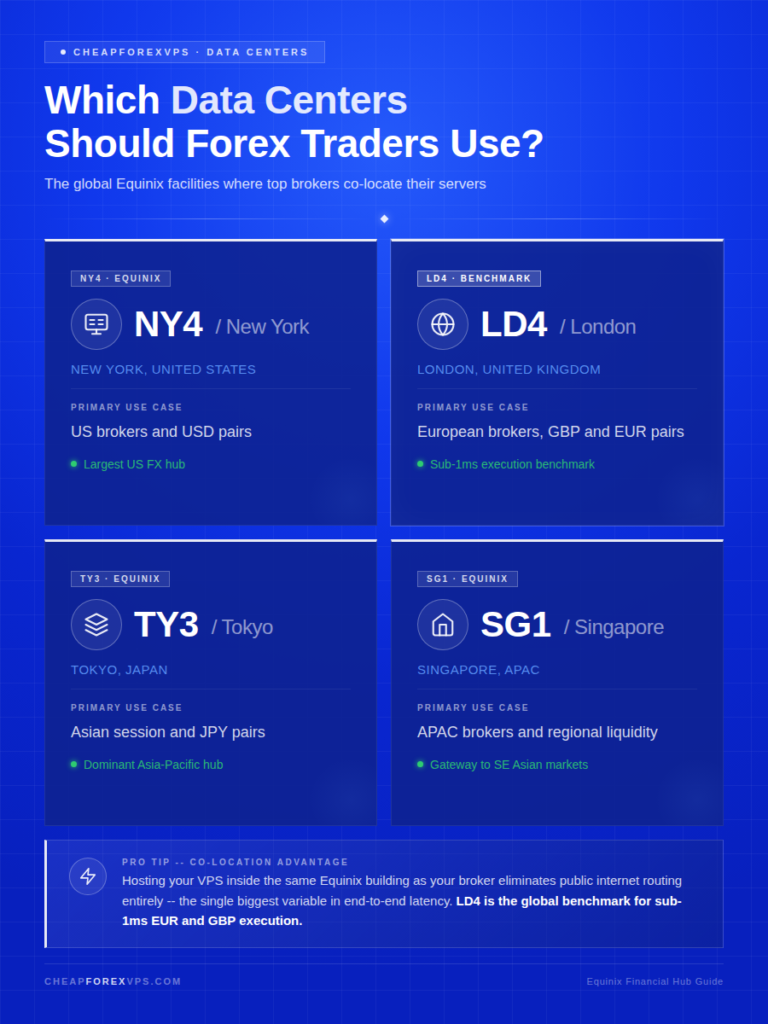
The three primary financial hubs for Forex trading are Equinix NY4 in New York, LD4 in London, and TY3 in Tokyo.
Most major Forex brokers and liquidity providers co-locate their servers inside Equinix facilities. Hosting your VPS within the same building eliminates public internet routing entirely, removing the largest variable in end-to-end latency.
|
Data Center |
Location | Primary Use Case |
|
NY4 (Equinix) |
New York, USA |
US brokers, USD pairs |
| LD4 (Equinix) | London, UK |
European brokers, GBP and EUR pairs |
| TY3 (Equinix) | Tokyo, Japan |
Asian session, JPY pairs |
| SG1 (Equinix) | Singapore |
APAC brokers and regional liquidity |
LD4 in London is the benchmark for low-latency Forex hosting in Europe. Hundreds of major brokers and liquidity providers operate from within that single facility, which makes co-location there the most direct path to sub-1ms execution for EUR, GBP, and related pairs.
What Are the Five Pillars of a Low-Latency Trading Setup?
A low-latency setup requires five coordinated layers: proximity hosting, hardware quality, network infrastructure, software configuration, and broker selection.
Each layer contributes to the total round-trip time (RTT) of your order. Optimizing one layer while neglecting the others leaves significant latency gains unrealized.
|
Pillar |
What to Do | Latency Impact |
|
Proximity hosting |
Host your VPS in the same Equinix facility as your broker | Reduces latency from 100ms+ to under 1ms |
|
Hardware quality |
Use NVMe SSD storage and high clock-speed CPUs | NVMe reads up to 7,000 MB/s vs. 3,500 MB/s on standard SSDs |
| Network infrastructure | Use a cross-connect or direct fiber-optic uplink |
Bypasses the public internet entirely |
| Software configuration | Disable unused indicators, sounds, and news feeds |
Keeps CPU usage below 50% on the trading server |
| Broker selection | Choose an ECN broker co-located in the same data center |
Removes the dealing desk as a processing layer |
Proximity hosting is the highest-impact change. Data travels through fiber-optic cable at roughly two-thirds the speed of light, meaning physical distance sets a hard floor on latency. A home connection routed across countries adds 100ms or more before the order reaches the broker’s gateway.
Network infrastructure is the next priority. A cross-connect is a direct physical cable linking two servers within the same data center, bypassing the public internet entirely. For retail traders without access to a cross-connect, a VPS with a dedicated fiber-optic uplink to the broker’s gateway achieves a comparable result.
Software configuration is the easiest fix and is often overlooked. Unnecessary indicators, sound alerts, and live news feeds compete for CPU cycles inside MT4 or MT5. Remove all non-essential indicators from active charts and run only the EAs that are currently live.
What Mistakes Increase Forex Trading Latency?
The three most common mistakes are hosting a VPS in the wrong region, overloading a single server, and relying on free broker-provided VPS plans.
Each mistake adds latency in a different way. Understanding them prevents configuration decisions that work against execution speed.
- Wrong region: A VPS in Singapore connecting to a London-based broker adds approximately 170ms of unavoidable physical latency. According to Verizon, the speed of light in fiber sets an absolute ceiling on data travel speed. Distance cannot be overcome through configuration.
- Server overload: Running multiple MT4 terminals on a single VPS pushes CPU usage above 50%, causing internal processing delays that compound with network latency. Each active terminal should have dedicated resources.
- Free VPS plans: Broker-provided free servers are typically shared across thousands of accounts. A 2023 industry survey found that free infrastructure fails at three times the rate of paid dedicated solutions.
Wi-Fi introduces a separate and unpredictable source of delay. Wired Ethernet connections provide significantly more stable latency than wireless signals, which are subject to interference and jitter. Traders working from a home setup should always use a wired connection for their trading machine.
How Do I Choose the Right Forex VPS Provider?
Choose a provider with servers inside Equinix NY4, LD4, or TY3, NVMe SSD storage, Windows Server OS, and a minimum 99.95% uptime guarantee.
According to Grand View Research, the VPS market is growing at a 12.1% CAGR, partly driven by demand from low-latency trading applications. Not all VPS providers are built for the continuous, resource-intensive workloads that Forex terminals and EAs require.
|
Criteria |
Minimum Requirement | Why It Matters |
|
Data center location |
Equinix NY4, LD4, or TY3 | Proximity to broker servers |
|
Storage type |
NVMe SSD | Up to 5x faster than standard SSDs |
|
Uptime guarantee |
99.95% |
Prevents EA downtime during market hours |
| OS support | Windows Server |
Native compatibility with MT4 and MT5 |
| Support availability | 24/7 live support |
Critical during live market incidents |
| Monthly cost | $5 to $50 |
Range covers retail to institutional needs |
Specialized providers with plans built around MT4 and EA workloads, like those available from CheapForexVPS, start at $5 a month, include a 5-day money-back guarantee, and maintain 99.95% uptime across NY4, LD4, TY3, and Singapore locations.
How to Cut Forex Trading Latency: Key Takeaways
Latency is a fixed cost in Forex trading. Every millisecond between your order and the market is an opportunity for slippage to occur. Moving from a home Wi-Fi setup to a dedicated Forex VPS in the right data center reduces execution time from 150ms to 300ms down to under 5ms.
The method is direct: use a VPS located inside or directly adjacent to your broker’s data center, configure your MT4 or MT5 terminal to minimize CPU load, and select a broker with ECN execution in the same Equinix facility. For traders running automated strategies, this setup is not optional. A strategy that performs as designed during backtesting fails in live markets when execution is delayed by 200ms on every trade.
Frequently Asked Questions About Forex Trading Latency
What is a good latency for Forex trading?
Under 50ms is acceptable for most retail traders. Scalpers and EA traders should target sub-5ms by using a VPS co-located with their broker. Anything above 100ms will cause measurable slippage on fast-moving pairs during volatile sessions.
What is slippage, and how does latency cause it?
Slippage is the difference between the price you requested and the price at which your order was filled. When latency is high, the market moves between the moment you send the order and the moment it reaches the broker’s server. A 50ms delay during a volatile period can produce 0.5 to 1.0 pip of slippage per trade, which erodes returns across any high-frequency or scalping strategy.
How do I check my current latency in MT4?
The bottom-right corner of your MT4 or MT5 terminal displays your current connection speed in milliseconds. That figure represents the round-trip time between your terminal and the broker’s server. Anything consistently above 50ms warrants a move to VPS hosting.
Can a VPN reduce Forex trading latency?
No. A VPN routes your data through an additional server, adding at least one extra network hop to every order. This increases latency rather than reducing it. Do not use a VPN on the connection running your trading terminal.
Does internet speed affect Forex trading latency?
Bandwidth in Mbps matters far less than ping in milliseconds. A stable 10 Mbps wired connection with 5ms ping outperforms a 1 Gbps Wi-Fi connection with 80ms ping and packet loss. Focus on connection stability and low jitter, not raw download speed.
Will a Forex VPS improve my trading results?
A VPS improves execution speed and keeps your platform online 24/7. It does not fix a losing strategy, but it ensures a working strategy executes as intended, without downtime or execution delays caused by your local internet connection.