Contact Info
118 ALJUNIED AVENUE 2, SINGAPORE (380118)
support@cheapforexvps.com
Recommended Services


Supported Scripts
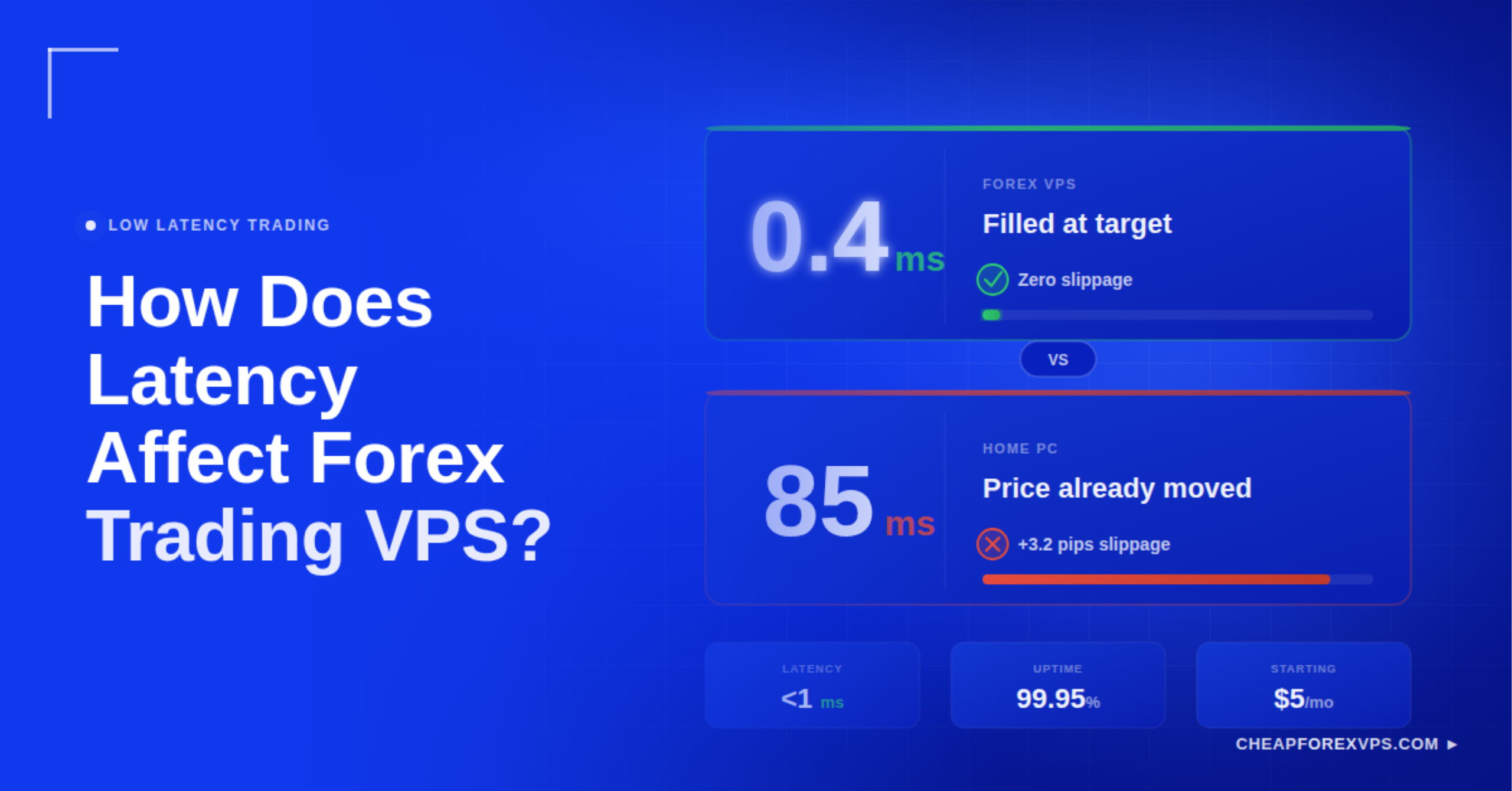
Latency is the time delay, measured in milliseconds, between sending a trade order and its execution on the broker’s server. When that delay is high, your order arrives after the price has already moved, resulting in a worse fill than intended. For scalpers and algorithmic traders running Expert Advisors (EAs), high latency is a direct cost on every trade.
The good news is that latency is largely controllable. Hosting your trading platform on a VPS server co-located with your broker can bring network latency under 5ms. This guide covers what latency is, how it damages trading performance, how to measure it, and how to choose the right low-latency Forex VPS.
What Is Latency in Forex Trading?
Latency in Forex trading is the total time, measured in milliseconds, for a trade signal to travel from your trading terminal to the broker’s execution server and back. The lower the latency, the closer your fill price is to your intended entry.
Think of it as the “ping” you see in online gaming. A high ping means your actions register late. In Forex, a high ping means your order arrives after the price has already moved.
The foreign exchange market processes over $7.5 trillion in daily turnover, according to the Bank for International Settlements (BIS). Much of that volume is driven by high-frequency algorithmic trading where execution speed is measured in microseconds. A 100ms delay in that environment is a systematic disadvantage on every trade.
Key latency terms:
|
Term |
Definition |
|
Latency |
Total round-trip delay between your terminal and the broker’s server |
|
Ping |
Network-layer measurement of that delay, expressed in milliseconds |
| Jitter |
Inconsistent latency that creates unpredictable execution timing |
| Slippage |
The price difference caused when your order arrives after the market has moved |
How Does High Latency Hurt Your Trading Performance?
High latency causes three specific execution failures: slippage, order rejections, and Expert Advisor malfunctions. Each reduces profitability independently, and all three compound when latency is consistently high.
|
Failure |
What Happens | Result |
|
Slippage |
Order arrives late; market has already moved | Worse fill price than intended |
| Order Rejection | Price moves beyond the broker’s accepted deviation range |
Trade is not placed at all |
| EA Malfunction | Signal arrives outside the EA’s maximum deviation limit |
Valid setup is skipped entirely |
What Is Slippage and Why Does It Matter?
Slippage is the difference between your expected fill price and your actual fill price. According to Finance Magnates, slippage can increase trading costs by up to 20% for active scalpers. At high trade frequency, this cost accumulates into a significant drag on returns.
Why Do Brokers Reject Orders During Fast Markets?
Brokers reject orders when the market price moves too far from your requested quote before the order arrives. This is most common during high-impact news events like the Non-Farm Payroll (NFP) release. A 500ms delay is enough to push your order outside the broker’s accepted deviation range.
How Does Latency Break Expert Advisor Execution?
Expert Advisors (EAs) are automated trading programs built to execute signals within specific price deviation limits. When latency is high, the signal arrives outside those limits. The trade is skipped entirely, regardless of how valid the setup was. A strategy that performs well in backtesting can consistently underperform live when VPS latency is too high.
What Is the Trade Transmission Framework?
Every trade order passes through four sequential stages before it is filled, and Stage 2, the VPS-to-broker path, is the only stage traders can directly control. Targeting this stage is where the most meaningful latency reductions happen.
|
Stage |
Description | Controllable? |
|
1. Terminal Processing |
MT4/MT5 processes the trade signal | Partially (hardware-dependent) |
|
2. VPS-to-Broker Path |
Signal travels from your VPS to the broker’s server |
Yes (server proximity) |
| 3. Broker Execution | Broker processes the order internally |
No |
| 4. Liquidity Provider Turnaround | Broker matches the order with a liquidity provider |
No |
Stages 3 and 4 are outside your control. Stage 2 is not. Placing your VPS in the same physical data center as your broker eliminates unnecessary network hops between the two systems.
Top Forex brokers host their execution engines in Equinix NY4 (New York) or Equinix LD4 (London). A co-located VPS can reduce Stage 2 latency to sub-1ms.
How Much Does High Latency Cost Per Trade?
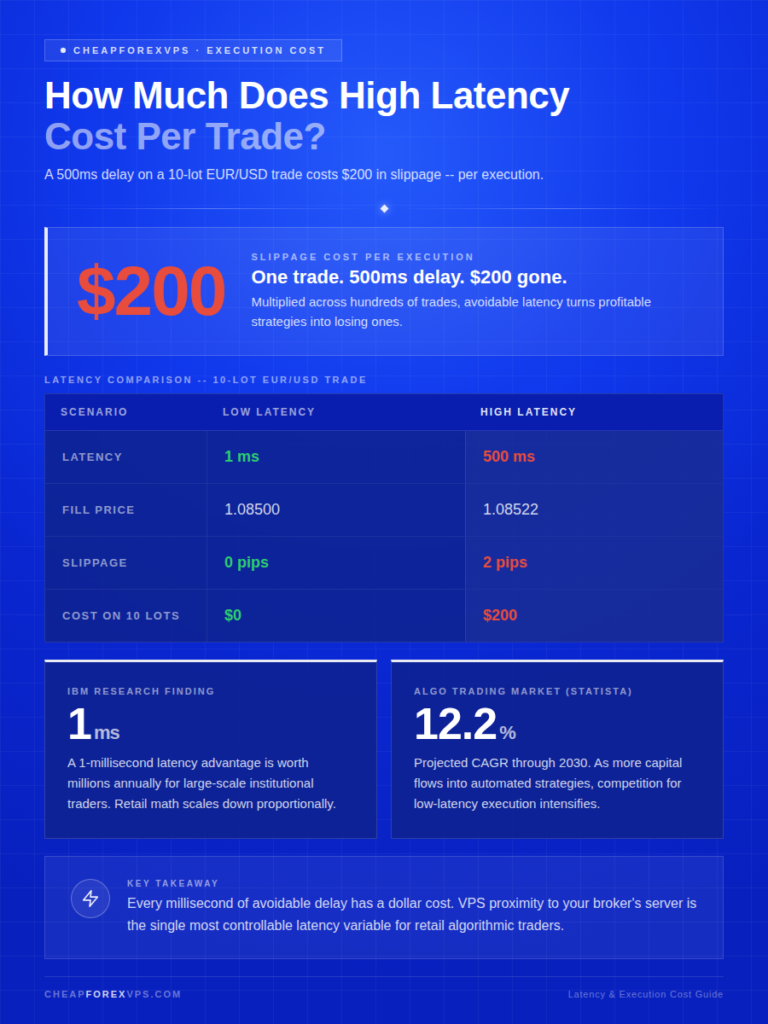
A 500ms latency delay on a 10-lot EUR/USD trade produces $200 in slippage per execution. Multiplied across hundreds of trades, that cost turns profitable strategies into losing ones.
|
Scenario |
Latency | Fill Price | Slippage |
Cost on 10 Lots |
|
Low Latency |
1ms | 1.0850 | 0 pips | $0 |
| High Latency | 500ms | 1.0852 | 2 pips |
$200 |
Research from IBM on financial markets indicates that a 1-millisecond latency advantage can be worth millions of dollars annually for large-scale institutional trading operations. For retail traders, the math scales down proportionally. Every millisecond of avoidable delay has a dollar cost.
The algorithmic trading market is projected to grow at a CAGR of 12.2% through 2030, according to Statista. As more capital moves into automated strategies, competition for low-latency execution intensifies.
How Do You Measure Your Trading Latency?
You can measure trading latency using three methods: the Windows ping command, MetaTrader’s built-in connection display, and third-party monitoring tools. Each captures a different layer of the total delay.
|
Method |
How to Use | Target |
|
Ping Command |
Run ping [broker IP address] in Windows Command Prompt | Under 5ms for scalpers; under 30ms is acceptable for most |
| MT4/MT5 Connection Status | Check the bottom-right corner of your MetaTrader platform |
Preferred reading; includes terminal processing overhead |
| Third-Party Dashboards | Use tools from Beeks Group or a Forex VPS provider |
Pepperstone targets fills under 30ms for 90% of orders |
Use all three methods to build a complete picture of your execution environment. If your MT4 reading is consistently higher than your CMD ping, the gap reflects terminal processing overhead, not network latency. The MT4 reading is the more relevant number for trading purposes.
Home PC vs. Standard VPS vs. Optimized Forex VPS: Which Is Best?
An optimized Forex VPS delivers 1ms to 5ms latency and 99.95% uptime, compared to 100ms to 500ms on a home connection and 20ms to 100ms on a standard cloud VPS. For EA traders and scalpers, this gap determines whether a strategy is viable in live conditions.
|
Feature |
Home PC (Wi-Fi) | Standard Cloud VPS | Optimized Forex VPS |
|
Average Latency |
100ms to 500ms | 20ms to 100ms | 1ms to 5ms |
|
Uptime |
~95% | 99.9% |
99.95% |
| Connection Type | Public Internet | Shared Network |
Low-Latency Cross-Connects |
| Slippage Risk | Very High | Moderate |
Extremely Low |
A Gartner report notes that specialized infrastructure remains essential for mission-critical, time-sensitive applications even as public cloud adoption grows. Forex trading is exactly that kind of workload: high sensitivity to network variance, low margin for error.
Two common mistakes to avoid:
- Choosing by price, not location. A VPS in Singapore connected to a broker in London will produce 150ms or more of latency regardless of hardware specs.
- Trading over Wi-Fi. Even fast Wi-Fi introduces jitter, causing erratic and unpredictable execution. Use a wired Ethernet connection, or a VPS with direct fiber to the network backbone.
How Do You Choose the Right Low-Latency Forex VPS?
Match your VPS location to your broker’s data center first. Every other selection criterion is secondary. A VPS in the correct city will outperform a more expensive server placed thousands of miles away.
Provider checklist:
|
Criteria |
What to Look For |
|
Proximity |
Servers in the same city or facility as your broker (Equinix NY4, LD4, TY3, or Singapore) |
|
Storage |
NVMe drives, which offer up to 10x faster data throughput than HDDs (IDC) |
| CPU |
High clock-speed cores; MT4 is single-threaded and does not benefit from many slow cores |
| Resource guarantee |
Dedicated RAM and CPU, not shared with other users on the same physical machine |
| Support |
24/7 support experienced in Forex platform issues, not generic hosting problems |
CheapForexVPS operates data centers in Equinix NY4, LD4, TY3, and Singapore. Plans start at $5 a month, backed by a 99.95% uptime guarantee and a 5-day money-back guarantee.
According to Grand View Research, the global VPS market is expanding as businesses prioritize dedicated performance over shared hosting. For Forex traders, the relevant subset is Forex-specialized providers whose infrastructure is built for MT4 and EA workloads.
How Latency Affects Forex Trading VPS: Key Takeaways
Latency is a measurable, manageable cost in Forex trading. High latency causes slippage, triggers order rejections, and breaks EA execution. Low latency, achieved by co-locating your VPS with your broker’s server, eliminates the network-related causes of all three.
The core principle:
- Physical proximity is the single biggest driver of latency reduction
- A VPS in the same Equinix facility as your broker outperforms any home connection or misplaced cloud server
- For scalpers and algo traders, a low-latency Forex VPS is not optional. It is the infrastructure that determines whether a strategy performs as backtested or bleeds pips on every entry
Start with a plan from CheapForexVPS and run your EAs from the same city as your broker.
Frequently Asked Questions About Forex Trading Latency
What is a good latency target for Forex trading?
Under 10ms is a solid target for most retail traders. Scalpers and high-frequency EA users should aim for sub-5ms, and ideally sub-1ms, which requires co-location in the same facility as the broker’s execution server.
Can a Forex VPS eliminate slippage entirely?
No. Slippage also occurs due to low market liquidity and broker processing time. A low-latency VPS removes the network-related causes of slippage, which is typically the largest controllable source of execution cost.
Does latency matter for swing traders?
It matters far less than it does for scalpers. Swing traders hold positions for days or weeks, so a few milliseconds at entry rarely changes the outcome. Accurate fills still improve entries at the margin, but latency is not a primary concern for this style.
How do I find my broker’s server location?
Ask your broker’s support team directly, or run a tracert command on the broker’s trading server IP address. The final destination hop will identify the data center location.
Why is my MT4 ping different from my CMD ping?
MT4 measures the round-trip time of an application-level heartbeat; CMD pings at the network layer. The MT4 reading captures terminal overhead as well as network transit time, making it the more accurate proxy for actual trading delay.
Does running multiple EAs increase latency?
Running too many EAs on an underpowered VPS creates internal CPU latency. Even with a fast network, the terminal cannot process signals quickly enough. The result is execution delays that mimic a slow network connection. Match your VPS CPU and RAM to the number of EAs you run.