Contact Info
118 ALJUNIED AVENUE 2, SINGAPORE (380118)
support@cheapforexvps.com


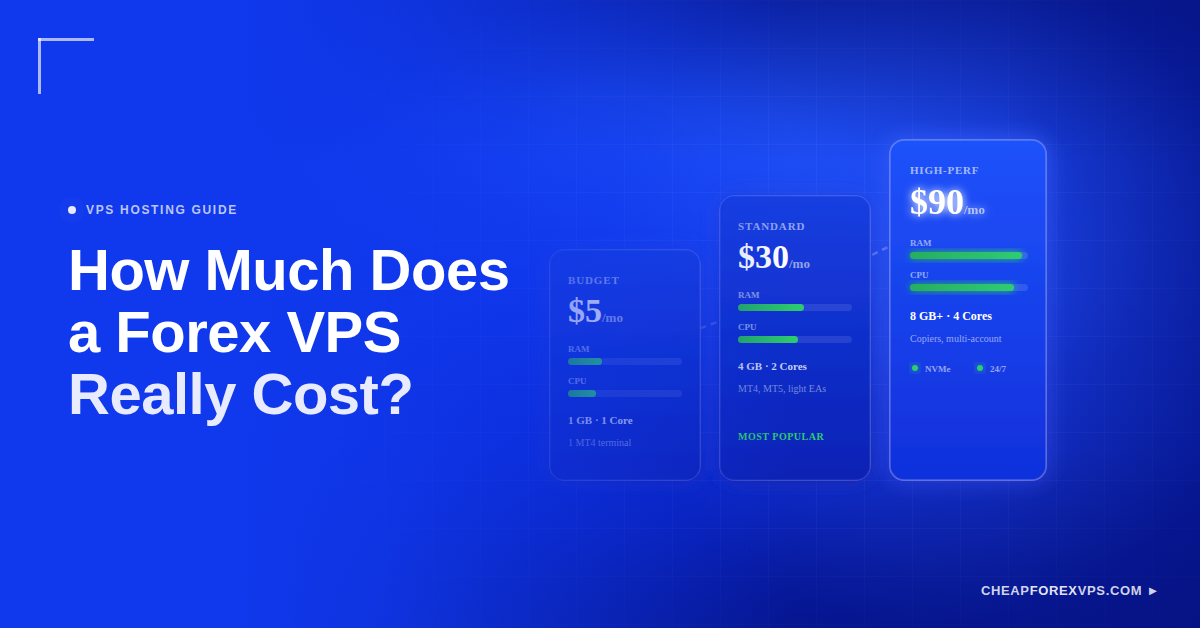
You want your trading platform online around the clock, but you do not want to pay for server power you will never use. That tension is what makes forex VPS pricing confusing. A forex VPS typically costs $5 to $30 per month for most traders, and the price scales with CPU cores, RAM, storage, and data center location rather than brand name.
A forex VPS is a virtual private server that keeps trading software like MetaTrader 4 running independently of your home computer. It stays online during market hours, reduces latency when the data center sits near your broker, and keeps Expert Advisors executing without interruption.
This guide breaks down what each forex VPS price tier includes, what drives the cost up, and how to match a plan to your trading setup without overpaying.
What Does a Forex VPS Cost Per Month?
A forex VPS costs $5 to $30 per month for most traders, with entry plans starting near $5 and high-spec plans for multiple Expert Advisors reaching $45 to $90. Price scales with CPU cores, RAM, and storage, not brand alone.
The right number depends on your workload. A beginner running one MT4 terminal pays far less than a trader running several platforms, trade copiers, and automated strategies at once.
The forex VPS market reflects that spread. The global VPS market was valued at around $5.6 billion and is projected to grow at a compound annual rate above 15% through 2030, according to Grand View Research, which keeps entry-level pricing competitive across providers.
A forex VPS supports these core trading tasks:
- Running MT4 and MT5 terminals continuously
- Executing Expert Advisors without a home computer online
- Operating trade copiers across broker accounts
- Running signal tools and indicators
- Reducing execution latency near broker servers
- Maintaining uptime through active market sessions
What Price Tiers and Features Should You Expect?
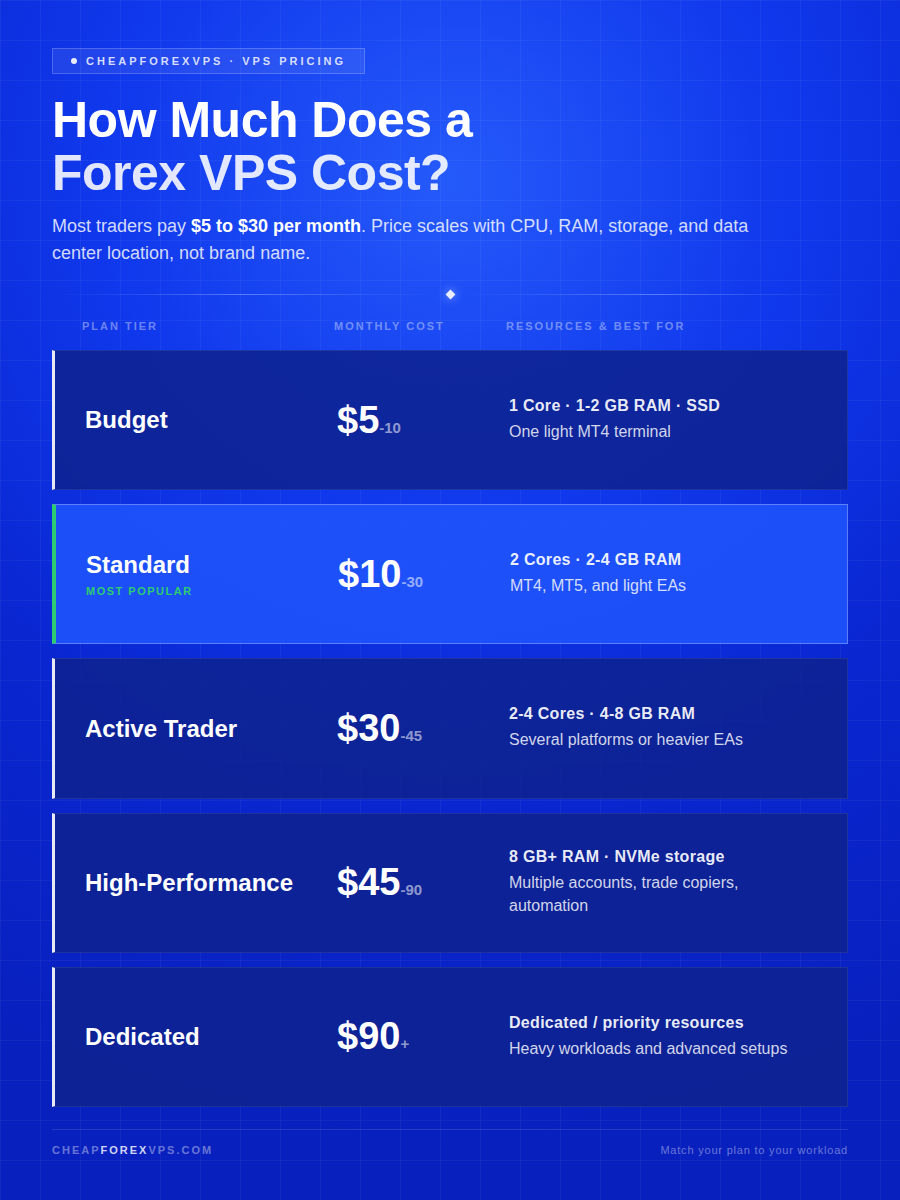
Forex VPS plans fall into five tiers, from $5 budget servers running one MT4 terminal to $90-plus dedicated setups built for heavy automation. Each tier changes the mix of CPU, RAM, storage, and performance.
The right choice depends on how many platforms, EAs, charts, and trade copiers you plan to run. A plan that is barely powerful enough will slow down during active market sessions, so leave headroom.
| Price Tier | Typical Monthly Cost | Common Resources | Best For |
| Budget forex VPS | $5-$10 | 1 CPU core, 1-2 GB RAM, basic SSD storage | One light MT4 terminal |
| Standard forex VPS | $10-$30 | 2 CPU cores, 2-4 GB RAM, more storage | MT4, MT5, light EAs |
| Active trader VPS | $30-$45 | 2-4 CPU cores, 4-8 GB RAM, faster storage | Several platforms or heavier EAs |
| High-performance VPS | $45-$90 | More CPU, 8 GB+ RAM, larger SSD/NVMe | Multiple accounts, trade copier, heavier automation |
| Dedicated forex VPS | $90+ | Dedicated or higher-priority resources | Heavy workloads and advanced setups |
Most traders do not need the largest plan. Entry-level Forex VPS hosting from providers like CheapForexVPS starts at $5 a month, which covers a single MT4 terminal comfortably.
What Does a $5 to $10 Forex VPS Cover?
A $5 to $10 forex VPS suits a simple, single-platform setup. It gives you 1 CPU core and 1 to 2 GB of RAM, which is enough for one terminal and light monitoring.
This tier works well for:
- One MT4 terminal
- One broker login
- A small number of charts
- One light Expert Advisor
- Basic trade monitoring
It is not built for many indicators, multiple accounts, or heavy trading software. Choose it when you need reliability without paying for unused capacity, and compare it against the cheapest forex VPS providers before committing.
What Does a $10 to $30 Forex VPS Cover?
A $10 to $30 forex VPS is the practical range for most active traders. It provides 2 CPU cores and 2 to 4 GB of RAM, which handles one to three platforms plus light automation.
This range typically covers:
- One to three trading platforms
- MT4 or MT5
- Several charts
- One or two Expert Advisors
- Light trade copying
- Normal remote desktop access
This tier gives the best balance between price and usability for everyday trading. It keeps costs low while providing enough RAM and CPU for stable performance.
What Does a $45 to $90 Forex VPS Cover?
A $45 to $90 forex VPS is built for heavy, multi-account automation. It provides 8 GB or more of RAM, faster NVMe storage, and stable CPU allocation for demanding setups.
This tier fits traders who run:
- Multiple MT4 terminals
- Multiple Expert Advisors
- Trade copiers across accounts
- Several broker accounts
- Many charts and indicators
- Automated strategies that require consistent uptime
Automated systems account for a large share of forex activity, with algorithmic trading estimated to drive over 70% of market volume, per industry analysis from Finance Magnates. Those systems need the uptime and resources this tier provides.
What Drives Forex VPS Cost Up?
Forex VPS cost rises with more RAM, more CPU cores, faster storage, Windows licensing, and premium data center locations. A cheap server and a premium VPS can both say “VPS” while delivering very different performance.
The price reflects the resources the provider allocates to your account. Each factor below adds cost for a specific reason.
How Do RAM and CPU Affect Price?
RAM and CPU are the two biggest cost drivers because they determine how many platforms and processes your VPS can run. RAM controls how many programs run comfortably, while CPU controls how fast the server handles indicators, EAs, and background tasks.
Match your resources to your workload using this guide:
| Trading Setup | Suggested RAM | Suggested CPU |
| 1 light MT4 terminal | 1-2 GB | 1 core |
| 1-2 platforms with light EAs | 2-4 GB | 1-2 cores |
| 3-5 platforms or several EAs | 4-8 GB | 2-4 cores |
| Heavy automation | 8 GB+ | 4+ cores |
More CPU and RAM raise the price because the provider must reserve more server capacity for your account.
How Do Storage and Windows Licensing Affect Price?
Storage type and operating system both affect price, though storage needs stay small for most traders. SSD and NVMe storage run faster than older disk storage, which improves platform responsiveness.
Trading platforms, logs, and EA files are usually small. Storage becomes a bigger factor only if you keep large logs, tick data, backtesting files, or many platform installations.
Windows VPS plans often cost more than Linux plans because most forex software is built around Windows. MT4 and MT5 install and run natively on Windows, which is why most traders choose it.
How Does Data Center Location Affect Price?
Data center location affects both price and execution speed because proximity to your broker reduces latency. Latency is the delay between sending a trade order and the broker receiving it, measured in milliseconds.
A VPS near your broker’s server shortens that delay and improves connection stability. Premium financial hubs like Equinix NY4 in New York, LD4 in London, and TY3 in Tokyo cost more because they sit close to broker infrastructure and liquidity venues.
Even a few milliseconds matters for automated systems, since faster execution locks in entry prices before the market moves and helps reduce slippage. A cheap plan in the wrong location can undercut the trading experience you are paying for.
How Do You Pick the Cheapest Plan That Still Works?
The cheapest useful forex VPS is the plan that runs your setup smoothly without wasting money on unused resources. Do not start with the biggest server. Start by counting what you actually need to run.
A light setup should start small, and a heavier setup should skip the lowest tier. If a VPS runs near its limits, upgrade before performance suffers.
What Should You Count Before Choosing a Plan?
Before choosing a plan, count every process your VPS must run at once. This inventory tells you which tier fits and prevents both overpaying and undersizing.
List the following before you order:
- Number of MT4 and MT5 terminals
- Number of Expert Advisors
- Number of charts per platform
- Number of broker accounts
- Trade copier use
- Indicator load
- Backup needs
- Low-latency requirements
- Expected remote desktop use
When Is a Cheap Forex VPS Enough?
A cheap forex VPS is enough when your setup is simple and single-platform. A budget plan handles one terminal, one broker account, and light monitoring without strain.
Choose a budget plan if you run:
- One trading platform
- One forex broker account
- A few charts
- One simple Expert Advisor
- Light manual monitoring
This suits traders who want reliable hosting without paying for resources they will not use.
When Should You Pay More?
Pay more when your setup adds multiple platforms, accounts, or automated strategies. A server that freezes or runs out of RAM costs more in missed trades than the price difference of a larger plan.
Upgrade if you run:
- Several MT4 terminals
- Several broker accounts
- Trade copiers
- Complex indicators
- Multiple automated strategies
- High-frequency systems
- Heavy remote desktop sessions
Cheap is only worthwhile when the VPS stays stable under your actual load, which matters most for high-frequency forex trading.
What Should You Check Before Ordering?
Before ordering, confirm the plan matches your workload, location, and uptime needs. Clear pricing and an easy upgrade path matter as much as the monthly rate.
Check each item below before you buy:
- Monthly price that fits your setup
- Enough RAM for your platforms
- CPU cores for stable performance
- SSD or NVMe storage
- Data center near your broker
- Reliable uptime during market hours
- Remote desktop access
- Responsive support
- Easy upgrade options
- Forex-ready server configuration
A strong provider makes pricing transparent and lets you scale as your trading grows.
What You Need to Know About Forex VPS Pricing
A forex VPS does not need to be expensive to be useful. For most traders, a $10 to $30 monthly plan provides enough CPU, RAM, and storage to run MT4, MT5, light EAs, and basic trade copying without paying for extra power.
The right choice depends on your actual workload. Start with the number of platforms, charts, EAs, broker accounts, and trade copiers you plan to run, then choose a plan with room to stay stable during active sessions. CheapForexVPS backs its plans with a 99.95% uptime guarantee, entry pricing from $5 a month, and a 5-day money-back guarantee, with data centers in New York, London, Tokyo, and Singapore for low-latency execution near major brokers.
Compare plans and match cost, resources, and location before you set up your server by reaching out to the CheapForexVPS team.
Frequently Asked Questions About Forex VPS Cost
Is there a truly free forex VPS?
Some brokers offer free VPS access, but it usually comes with conditions such as minimum deposits or trading volume requirements. A truly free VPS with no limits and reliable performance is uncommon. Most traders get better stability from a low-cost paid plan starting around $5 a month.
Why do some plans cost so much more?
Higher-priced plans include more CPU, RAM, storage, premium data center locations, and stronger uptime. They also support more trading platforms, heavier Expert Advisors, and more demanding automation. You pay more because the provider reserves more server capacity for your account.
Does a cheaper plan mean slower execution?
Not always. A cheaper plan performs well if it sits near your broker and has enough resources for your setup. Execution slows only when the server is overloaded, underpowered, or hosted far from the broker’s trading servers.
How much RAM does a forex VPS need?
A single MT4 terminal runs fine on 1 to 2 GB of RAM. Running three to five platforms or several EAs calls for 4 to 8 GB. Heavy automation with trade copiers and multiple accounts needs 8 GB or more.
Is a Windows or Linux forex VPS cheaper?
Linux plans are usually cheaper because they carry no operating system licensing cost. Windows plans cost more but run MT4 and MT5 natively, which is why most forex traders choose Windows despite the price difference.
Can I upgrade my forex VPS later?
Yes. Most providers let you upgrade RAM, CPU, and storage as your setup grows. Choose a provider with a clear upgrade path so you can start small and scale without migrating to a new server.