Contact Info
118 ALJUNIED AVENUE 2, SINGAPORE (380118)
support@cheapforexvps.com


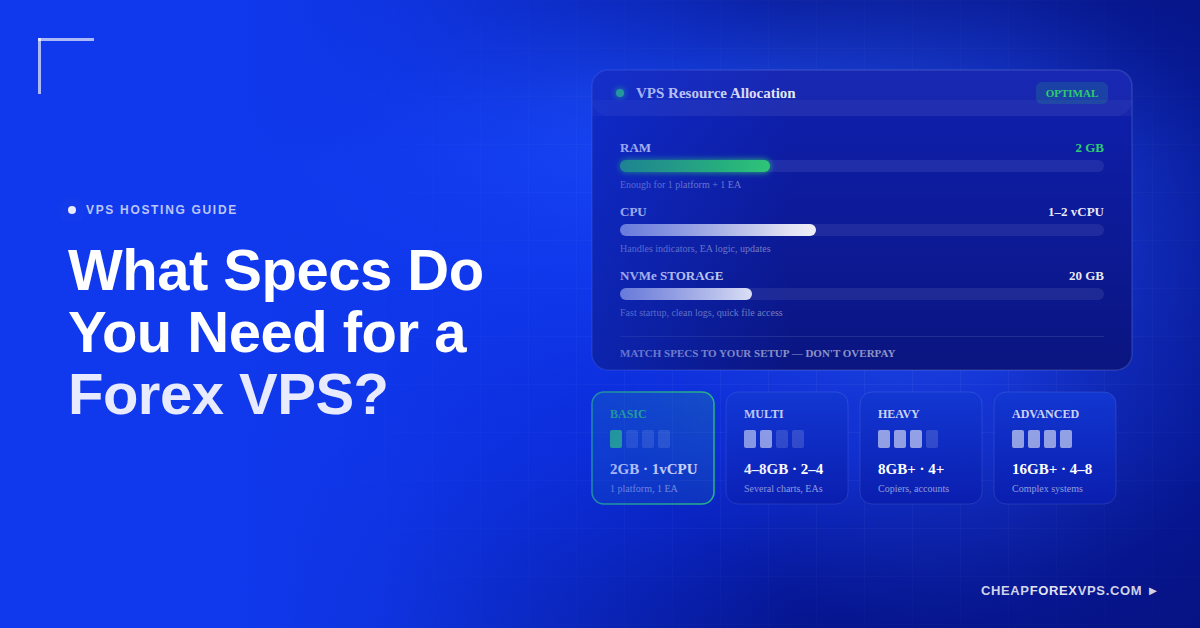
Most Forex VPS plans list CPU, RAM, storage, and latency, and beginners often assume more of each is always better. That assumption leads to overpaying for power that sits idle. A Forex VPS is a remote Windows server that keeps MetaTrader 4 (MT4), MetaTrader 5 (MT5), and Expert Advisors (EAs) running around the clock. The specs you actually need depend on how many platforms, accounts, EAs, indicators, and charts you plan to run at once.
This guide breaks down the exact RAM, CPU, and storage needed for each setup size, explains why each spec matters, and shows how to avoid both overpaying and overloading your server.
What Specs Do You Need for a Forex VPS?
For one or two EAs, you need about 2GB RAM, 1-2 vCPUs, and 20GB of NVMe storage. Multi-chart or multi-account setups need 4-8GB RAM and more cores. Match your specs to your platform count rather than buying the largest plan available.
An Expert Advisor (EA) is an automated trading program that runs inside MetaTrader and executes trades based on preset rules. A small VPS handles a clean setup well, while a larger server is better for multiple MT4 or MT5 instances, heavy indicators, or automated strategies.
The best starting point is to count what will run on the server:
- Number of MT4 terminals
- Number of MT5 terminals
- Number of EAs
- Number of charts
- Number of broker accounts
- Indicator load
- Trade copier use
- Remote desktop use
MetaTrader 4 remains the most widely used retail Forex platform worldwide, with millions of active traders relying on its EA support, which is why most VPS providers optimize their base plans around it. A well-chosen VPS gives your setup enough room to run smoothly without wasting money on unused capacity.
What Spec Requirements Match Each Setup Size?
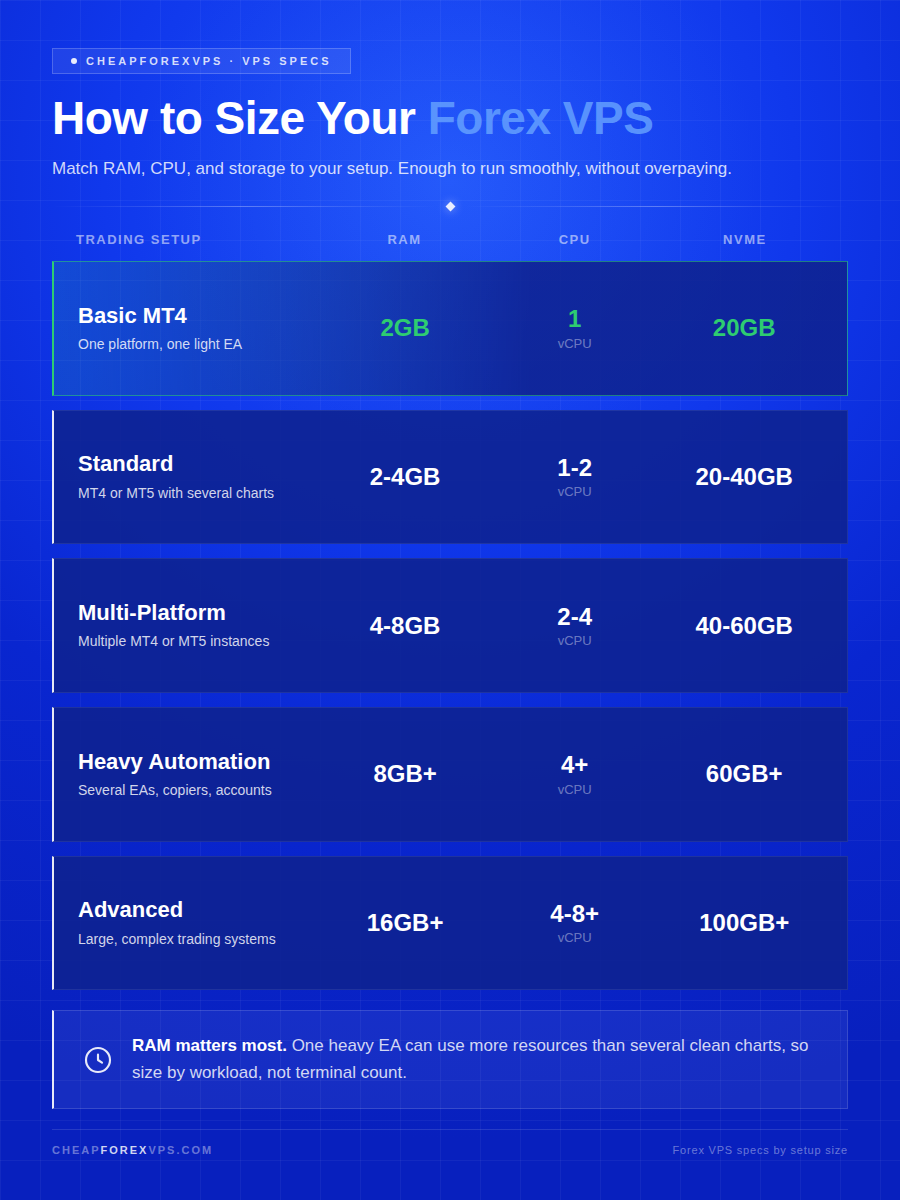
Basic setups run on 2GB RAM and 1 vCPU, while heavy automation needs 8GB+ RAM and 4+ vCPUs. The table below maps common trading configurations to the specs that keep them stable.
| Trading Setup | Suggested RAM | Suggested CPU | Suggested Storage | Best For |
| Basic MT4 setup | 2GB | 1 vCPU | 20GB NVMe | One platform, one light EA |
| Standard trader setup | 2-4GB | 1-2 vCPUs | 20-40GB NVMe | MT4 or MT5 with several charts |
| Multi-platform setup | 4-8GB | 2-4 vCPUs | 40-60GB NVMe | Multiple MT4 or MT5 instances |
| Heavy automation setup | 8GB+ | 4+ vCPUs | 60GB+ NVMe | Several EAs, copiers, and accounts |
| Advanced trading setup | 16GB+ | 4-8+ vCPUs | 100GB+ NVMe | Large workloads and complex systems |
This table is a practical guide, not a strict rule. It prevents the two most common sizing mistakes: buying far more than the workload requires, or cramming too much onto an underpowered plan.
Which Setup Fits a Beginner Trader?
A beginner trader running one MT4 platform, one broker account, and one EA can operate comfortably on a small VPS. There is no need to pay for a large plan at this stage.
Start with:
- 2GB RAM
- 1 vCPU
- 20GB NVMe
- Windows Server
- Data center near the Forex broker
This configuration keeps a simple setup responsive and the monthly cost low. Entry-level Forex VPS plans typically start from around $5 a month, which covers this specification comfortably.
Which Setup Fits Multiple Accounts?
Running multiple MT4 or MT5 terminals needs 4-8GB RAM because each platform consumes its own memory, CPU, logs, and network resources. A single VPS can manage several light platforms, but it should not be pushed to its limit.
Choose 4-8GB RAM if you run:
- Several accounts
- Several EAs
- A trade copier
- Multiple charts
- MT4 and MT5 together
- More than one broker connection
If the server feels slow during a trading session, upgrade before live trading performance suffers. Latency during high-volume sessions can widen slippage, so headroom on a busy server directly protects execution quality.
Why Does RAM Matter Most for MetaTrader?
RAM matters most because each open platform, chart, indicator, and EA holds data in memory to stay responsive. MT4 is light compared with many modern applications, but multiple terminals add up quickly.
Every symbol feed and running EA increases memory use. The more you run at once, the more RAM your VPS needs to avoid slowdowns.
How Much RAM Does MT4 Usually Need?
A single light MT4 instance runs on 1-2GB, while a heavier setup with indicators, tick tools, and EAs can use several times that. Plan by workload, not just terminal count.
| MT4 Setup | Suggested RAM Plan |
| 1 MT4 terminal | 1-2GB RAM plan |
| 2-3 terminals | 2-4GB RAM plan |
| 4-6 terminals | 4-8GB RAM plan |
| 7+ terminals | 8GB+ RAM plan |
One heavy EA can consume more resources than several clean charts, so weigh the complexity of what runs on each terminal, not only how many there are.
What Happens When RAM Is Too Low?
When RAM runs low, the Windows VPS slows down and the trading platform may freeze, lag, or respond late. Low memory does not change broker latency directly, but it makes the platform behave unreliably.
Insufficient RAM can degrade:
- Platform switching
- EA stability
- Chart loading
- Order management
- Copier speed
- Remote desktop responsiveness
A server struggling for memory makes consistent trading harder, especially during fast-moving markets when the platform is under load.
Why Do CPU Cores Matter for EAs and Platforms?
CPU cores matter because they process indicators, EA logic, platform updates, scripts, and background Windows tasks. One light MT4 setup runs on 1 vCPU, while heavier or multiple platforms need 2-4 vCPUs for stability.
The CPU does the calculation work behind every chart and automated strategy. When it is underpowered, that work queues up and orders are delayed before they leave the server.
When Do You Need More CPU?
Choose more CPU cores when your setup includes heavy automation or multiple simultaneous processes. CPU spikes are common during volatile sessions, and extra cores keep the VPS responsive when prices move fast.
Add more CPU if you use:
- Multiple Expert Advisors
- Heavy indicators
- Many charts
- Trade copiers
- Fast automated trading
- Multiple broker feeds
- Multiple MT4 or MT5 platforms
Can CPU Affect Latency?
CPU affects execution speed even though network latency depends mostly on the route between the VPS data center and the broker server. Latency is the delay between sending an order and the broker receiving it.
A weak CPU delays an EA signal before the order ever leaves the server, adding to total execution time. A low-latency VPS in the right location performs best only when the platform itself has enough processing power to keep up.
Why Does NVMe Storage Beat Older SSD or HDD?
NVMe storage beats older SSD and HDD because it is built for high-speed data access, loading Windows, logs, and platforms faster. For a Forex VPS, speed matters far more than raw capacity.
NVMe (Non-Volatile Memory Express) is a storage interface designed for modern high-throughput systems, delivering read and write speeds well beyond traditional drives. That speed improves:
- Platform startup time
- Windows responsiveness
- Log handling
- Performance during updates
- File access speed
A Forex VPS rarely needs large storage. It needs fast, reliable storage that keeps the platform snappy.
Is 20GB Enough for Most Traders?
Yes, 20GB NVMe is enough for a basic MT4 or MT5 setup when the server is kept clean. It comfortably covers one platform with a couple of EAs and normal logs.
Use 20GB when you run:
- One platform
- One or two EAs
- Few indicators
- Normal logs
- Minimal downloads
Choose more storage if you keep backtests, tick data, screenshots, several platforms, or large volumes of log files.
How Do You Keep Storage Clean?
Keeping storage clean means removing anything the active platform does not need. A tidy server is easier to manage and less likely to slow down.
Use these habits:
- Delete old installers after setup
- Clear unnecessary downloads
- Archive old logs when safe
- Remove unused indicators
- Keep only active platforms installed
- Avoid using the VPS as general cloud storage
How Do You Avoid Overpaying for Specs?
Avoid overpaying by matching your plan to your current workload, not the largest option on the page. The opposite mistake is choosing the smallest plan and overloading it, which hurts performance. The goal is enough headroom to run smoothly, and no more.
Both extremes cost you. An oversized plan wastes money every month, while an undersized plan risks slow execution when it matters most.
What VPS Mistakes Should Beginners Avoid?
The most common beginner mistake is buying specs without checking the actual workload. Each error below either wastes money or undermines reliability.
- Buying too much RAM for one light EA
- Using a generic VPS far from the broker
- Choosing storage size but ignoring speed
- Running too many terminals on a small VPS
- Ignoring CPU usage during busy sessions
- Picking a plan without upgrade options
- Using a free VPS for live trading without checking limits
A free VPS often comes with restrictions, weak resources, or broker conditions. For live trading, reliability matters more than the lowest possible price, which is why uptime guarantees such as 99.95% are a core reason traders choose a specialized Forex VPS over a generic one.
How Should You Choose a Forex VPS Plan?
Match your plan to your current setup rather than a future dream configuration. Scale up only when your workload genuinely demands it.
Before ordering, check:
- RAM for platforms and EAs
- CPU cores for charts and automation
- NVMe storage for faster file handling
- Windows Server version for MT4 or MT5 compatibility
- Data center location near your broker
- Latency to the broker for faster order flow
- Upgrade options for future growth
- Support quality when issues arise
- Whether the VPS is optimized for Forex
What You Need to Know About Forex VPS Specs
The right Forex VPS matches resources to your trading plan, not your aspirations. For one or two EAs, 2GB RAM, 1-2 vCPUs, and 20GB NVMe is the sensible baseline, while multi-account and heavy-automation setups justify 4-8GB RAM and additional cores. RAM keeps platforms responsive, CPU processes EA logic, and NVMe speeds up everything Windows loads. Server location near your broker and low latency protect execution quality, and upgrade options keep you covered as your workload grows.
A well-sized VPS feels stable, not oversized, and it never forces you to pay for power you do not use. CheapForexVPS specializes in Forex and trading VPS hosting with plans from $5 a month, a 99.95% uptime guarantee, a 5-day money-back guarantee, and data centers at Equinix NY4 (New York), LD4 (London), TY3 (Tokyo), and Singapore, close to major broker servers.
Compare plans and match specs to your trading setup by reaching out to our team.
Frequently Asked Questions About Forex VPS Specs
How much RAM per MT4 instance?
Plan around 1GB per light MT4 instance, then add room for indicators, EAs, charts, and Windows. A simple setup runs on 2GB RAM, while multiple MT4 terminals usually need 4-8GB.
Do I need more than one CPU core?
Not always. One light platform can run on a single vCPU, but two or more cores are better for multiple platforms, heavy EAs, and smoother remote desktop use.
Is 20GB storage enough?
Yes, 20GB NVMe storage is enough for a basic Forex VPS with one MT4 or MT5 platform. Choose more if you run several platforms, store logs, use backtesting data, or keep many custom files.
Does a Forex VPS reduce latency?
Yes, a Forex VPS located near your broker’s server reduces latency by shortening the network route your orders travel. Data center proximity matters more than raw specs for order speed.
Can I upgrade my VPS later?
Yes, most Forex VPS providers let you scale RAM, CPU, and storage as your workload grows. Choosing a plan with clear upgrade options avoids migration hassle later.
Is a free VPS good enough for live trading?
No, free VPS plans often carry resource limits, restrictions, or broker conditions that make them unreliable for live trading. For real accounts, uptime and stability matter more than saving a few dollars.