Contact Info
118 ALJUNIED AVENUE 2, SINGAPORE (380118)
support@cheapforexvps.com
Recommended Services


Supported Scripts
Running a trading strategy on a home computer means accepting one serious risk: downtime at the wrong moment. A power cut, an ISP outage, or a frozen machine while a position is open can cost more than a month of trading fees. A Forex VPS eliminates that risk by running your trading platform on a remote server that stays online 24/7, regardless of what happens at your end.
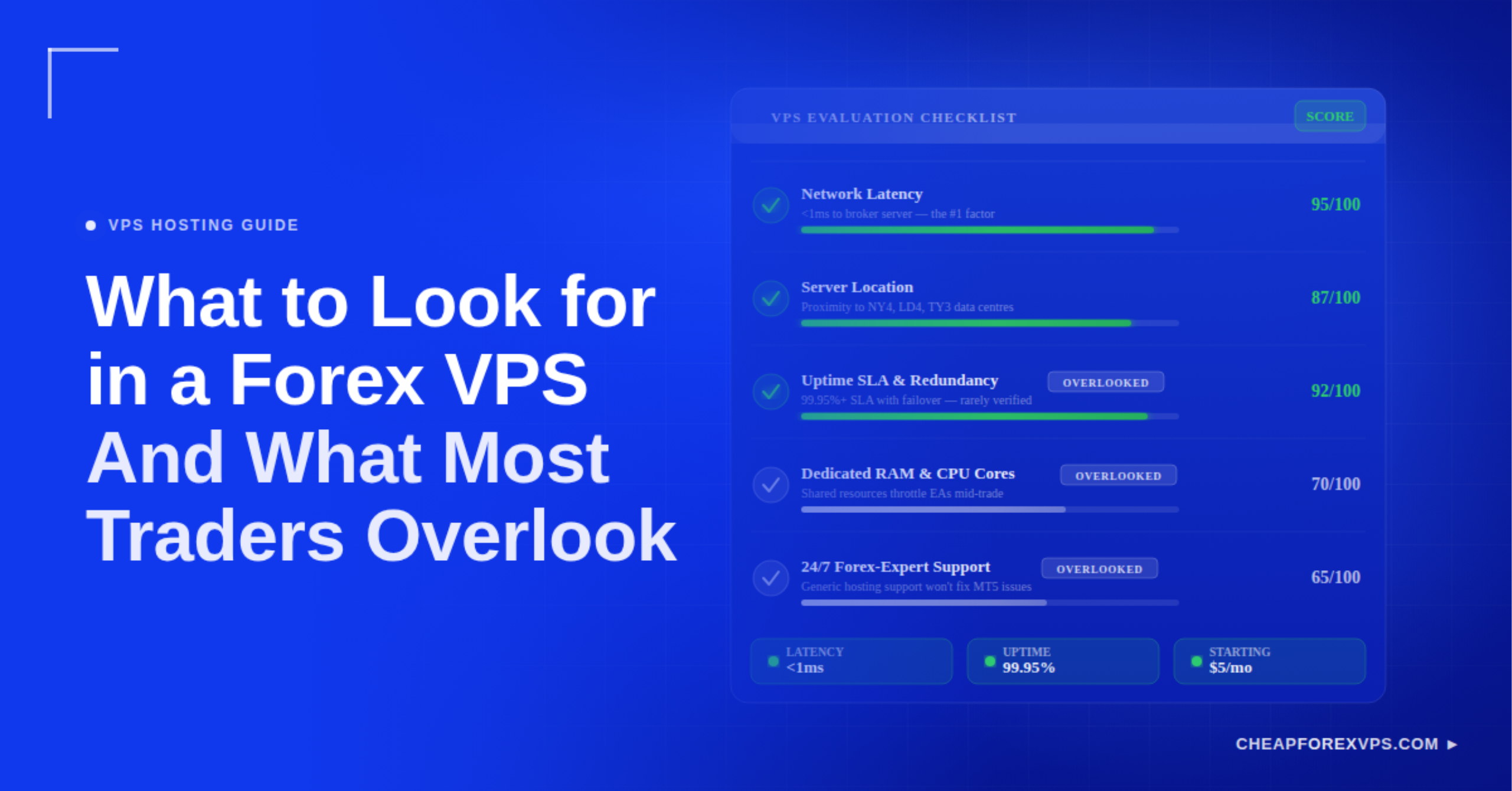
The four factors that determine whether a VPS is worth using are latency to your broker’s server, guaranteed uptime, hardware resources, and operating system compatibility. Getting these right is the difference between a strategy that executes cleanly and one that bleeds pips to slippage and missed signals.
This guide covers each factor in practical terms so you can evaluate any Forex VPS plan before you commit.
Why Does Latency Matter for Forex Trading?
Latency is the single most important technical factor in Forex VPS selection because it determines how quickly your orders reach your broker’s matching engine.
Latency is the time, measured in milliseconds, that a data packet takes to travel from your VPS to your broker’s server and back. High latency means your order arrives late, the price has already moved, and you are filled at a worse level. This is called slippage, and it compounds across every trade you make.
A delay of 100 milliseconds can cause a price difference of 0.5 to 1.0 pips on volatile pairs like GBP/JPY. On a single standard lot of EUR/USD, a 1-pip difference costs $10. Across 20 trades a month, that is $200 in losses attributable entirely to connection speed, which is more than the annual cost of a premium Forex VPS.
|
Latency Range |
Impact | Suitable For |
|
Under 1ms |
Near-zero slippage | High-frequency scalpers |
|
1ms to 5ms |
Minimal slippage |
Retail scalpers, news traders |
| 5ms to 20ms | Acceptable for most EAs |
Swing traders, automated strategies |
| Over 20ms | Measurable slippage risk |
Manual traders only |
What Uptime Guarantee Should a Forex VPS Have?
A Forex VPS must offer at least 99.9% guaranteed uptime, and reputable specialized providers deliver 99.95% or higher.
A 99.9% uptime guarantee still allows for up to 8.7 hours of downtime per year. That threshold is acceptable until a server outage coincides with a high-impact news event. CheapForexVPS provides a 99.95% uptime guarantee, which limits annual downtime to under 4.4 hours, backed by Tier 3 and Tier 4 data centers with redundant power and network feeds.
Uptime guarantees are only meaningful when backed by real infrastructure. Before committing to a provider, confirm it offers:
- Redundant power supplies with backup generators
- Multiple internet service providers (ISPs) at each facility
- Hardware redundancy to recover from drive or node failures
- A published service level agreement (SLA) with compensation terms for breaches
What Hardware Specifications Do You Need for a Forex VPS?
You need at least 1GB of RAM per 2 MetaTrader terminals, SSD storage, and a dedicated CPU allocation rather than a shared resource pool.
MetaTrader 4 and MetaTrader 5 are resource-intensive, particularly when running complex Expert Advisors (EAs) across multiple currency pairs with active indicators. According to Grand View Research, the algorithmic trading market is projected to grow at a compound annual growth rate of 10.5% through 2030, which means EA complexity and hardware demands will continue to increase.
How Much RAM Do You Need for MT4 or MT5?
Plan on 1GB of RAM for every 2 MetaTrader terminals running simultaneously.
A single MT4 instance typically consumes between 150MB and 300MB of RAM under normal load. Multiple EAs, indicator calculations, and chart data push that figure higher. A plan with 2GB of RAM handles 2 to 3 terminals comfortably and leaves overhead for system processes.
Why Does Storage Type Affect Trading Performance?
SSD storage is mandatory for a trading VPS because it eliminates the read/write latency that affects platform logging, EA data access, and restart recovery time.
Trading platforms generate continuous log files and tick data. SSDs process these operations significantly faster than mechanical HDDs. When your VPS restarts after a system update or failover event, SSD-equipped machines return to a running state much faster than those on conventional drives.
Which VPS Location Is Best for Forex Trading?
The best VPS location is the one physically closest to your broker’s primary matching engine, which is typically one of four major financial data centers.
Equinix operates the four facilities used by most Forex brokers: NY4 in New York, LD4 in London, TY3 in Tokyo, and a hub in Singapore. CheapForexVPS maintains servers in all four locations. Placing your VPS in the same facility as your broker’s server reduces the physical distance a data packet must travel, which is the primary driver of raw latency.
To identify the right location:
- Contact your broker’s support team and ask which Equinix data center their servers use.
- Select a VPS plan located in that same facility.
- Run a ping test from your VPS to your broker’s server IP to verify latency.
- If your broker operates across multiple locations, choose the one closest to your primary trading session.
Choosing a VPS in London when your broker’s matching engine is in New York adds 70 to 80 milliseconds of round-trip latency. That gap is entirely avoidable with the right provider.
How Do You Test a Forex VPS After Setup?
Run three tests immediately after provisioning: a ping test to your broker’s server, a RAM and CPU load test with all EAs active, and a platform latency check inside MetaTrader.
These three tests confirm whether the VPS performs under real trading conditions, not just in a vendor’s benchmark environment.
|
Test |
How to Run | Acceptable Result |
|
Ping test |
Open Command Prompt, type ping [broker server IP] | Under 5ms |
| MT4 latency | Check the bottom-right corner of your MetaTrader terminal |
Under 20ms |
| CPU and RAM usage | Open Task Manager with all EAs running |
Under 80% of total capacity |
If the ping test returns results above 20 milliseconds, your VPS location does not match your broker’s server location. CheapForexVPS offers plans from $5 a month with a 5-day money-back guarantee, which makes it practical to test a plan under live conditions before committing.
Which VPS Configuration Matches Your Trading Style?
Your trading style determines whether you should optimize for latency, uptime, or raw compute capacity.
Scalpers execute dozens of trades per session targeting 1 to 5 pips, so every millisecond of latency eats directly into their edge. Swing traders hold positions for hours or days, making uptime and hardware stability more important than raw speed. News traders need high CPU burst capacity to handle the data processing spike that occurs during releases like the NFP report or CPI announcements.
|
Trading Style |
Top Priority | Minimum RAM | Target Latency |
|
Scalper |
Lowest latency | 2GB | Under 1ms |
|
News trader |
CPU burst capability | 4GB |
Under 5ms |
| Swing trader | Uptime reliability | 1GB |
Under 20ms |
| Multi-EA operator | RAM and SSD capacity | 4GB+ |
Under 10ms |
What to Look for in a Forex Trading VPS: Key Takeaways
The right Forex VPS reduces slippage, keeps your EAs running through market events, and removes the hardware failure risk that comes with home-based setups. Latency to your broker’s matching engine is the starting point for evaluating any plan. Uptime guarantees, SSD storage, and sufficient RAM follow from there. If you run MT4 or MT5, Windows Server compatibility is also non-negotiable.
Providers that specialize in trading infrastructure understand these requirements in ways general-purpose hosting companies do not. CheapForexVPS has operated in this space for over 7 years, with server presence at Equinix NY4, LD4, TY3, and Singapore, a 99.95% uptime guarantee across all plans, and plans starting from $5 a month.
Choose a plan that matches your broker’s data center and your trading style at CheapForexVPS.
Frequently Asked Questions About Forex Trading VPS Selection
What is the ideal latency for a Forex VPS?
Latency under 5 milliseconds is the standard benchmark for retail traders running Expert Advisors. High-frequency scalpers target sub-1ms, while swing traders can operate acceptably at under 20ms.
Can I run multiple MT4 accounts on one VPS?
Yes. Plan on 1GB of RAM for every 2 MT4 terminals. Running 4 to 6 terminals simultaneously requires at least 2GB to 4GB of RAM to avoid performance degradation.
Do I need a Windows VPS for Forex trading?
Yes, if you use MT4 or MT5. Both platforms are built for Windows environments. Windows Server 2019 and 2022 are the current standard and offer the best compatibility with most trading tools.
Is a cheap Forex VPS safe to use?
Price alone is not a reliable indicator of quality. Oversold shared servers often fail during periods of high market volatility. Look for providers that guarantee dedicated CPU and RAM resources and publish a specific uptime SLA with defined compensation terms.
What happens to my open trades if the VPS goes offline?
Open positions remain with your broker and continue to be subject to market movement. You lose the ability to manage or close them until the VPS is back online. Choosing a provider with a 99.95% uptime guarantee and redundant infrastructure reduces this risk substantially.
Should I use SSD or HDD storage on my trading VPS?
Use SSD. Solid state drives handle the continuous logging and data access that trading platforms generate at speeds HDDs cannot match, and they recover faster after restarts.