Contact Info
118 ALJUNIED AVENUE 2, SINGAPORE (380118)
support@cheapforexvps.com


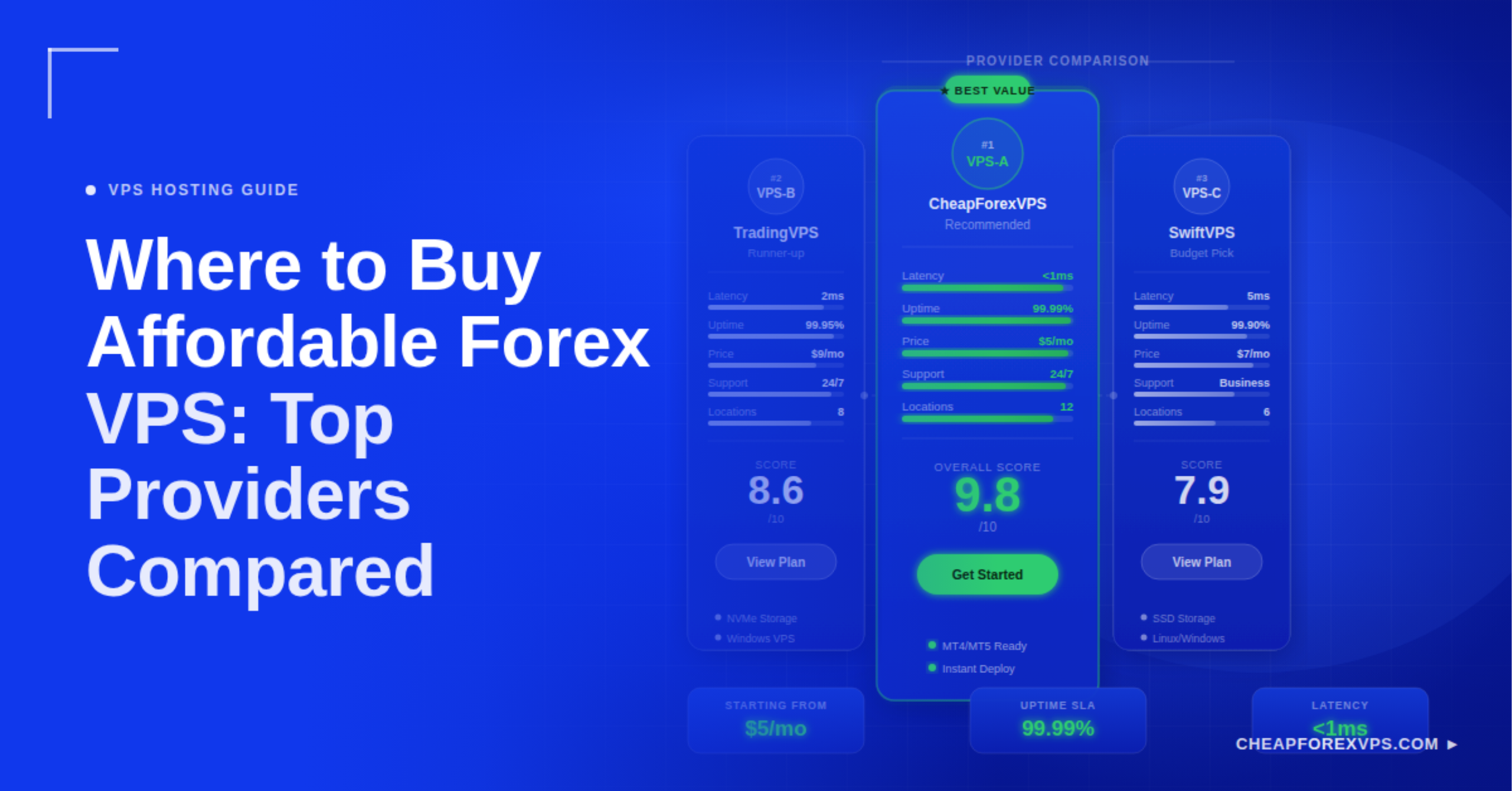
A Forex VPS (Virtual Private Server) is a remote Windows computer inside a professional data center that runs your trading platform around the clock. The most affordable option for retail traders is CheapForexVPS, with plans starting at $5 a month, MetaTrader pre-installed, and Equinix co-location in New York, London, Tokyo, and Singapore.
Not every cheap VPS is a suitable Forex VPS. A generic server and a Forex-optimized one can cost the same but deliver completely different results: one is tuned for web hosting, the other is co-located next to your broker’s matching engine.
This guide compares the top providers, covers the hardware specs your strategy needs, and shows you how to verify performance before going live.
What Is a Forex VPS and Why Does Every EA Trader Need One?
A Forex VPS is a virtual Windows server inside a financial-grade data center, built to run MetaTrader and automated trading systems without interruption.
A home trading setup has three critical failure points:
- Internet outages
- Local power interruptions
- OS restarts for updates or antivirus scans
Any one of them can leave an active position unmanaged or cause an EA to miss its scheduled signal.
According to the Bank for International Settlements’ 2022 Triennial Central Bank Survey, the global Forex market processes $7.5 trillion in daily turnover. In an environment that fast, execution consistency is a competitive necessity, not a preference.
What a Forex VPS provides that a home computer cannot:
- Always-on execution: Your EAs and platforms run 24/5 without depending on your home machine.
- Sub-10ms latency: Co-location near your broker’s server reduces signal-to-fill delay from 100ms or more to under 5ms.
- Isolated resources: Your trading environment runs independently of updates, antivirus scans, and other local processes.
- DDoS mitigation and redundant power: Equinix-grade data centers include network-level attack protection and N+1 power redundancy.
- Remote Desktop access: Connect via RDP from any device to a full Windows desktop.
Which Providers Should You Consider for Affordable Forex VPS Hosting?
Providers fall into two categories: Forex-specialized hosts with MetaTrader pre-installed and financial data center co-location, and general-purpose VPS hosts that offer Windows servers with no trading optimization.
Specialized providers often cost the same as generic alternatives once you factor in the Windows license, manual MetaTrader setup, and the slippage cost of being in the wrong data center. Here is how each provider stacks up.
CheapForexVPS
CheapForexVPS is built exclusively for MetaTrader traders and algorithmic strategies, with over 7 years in the industry.
| Detail | Spec |
| Starting price | $5/month |
| MetaTrader | MT4 and MT5 pre-installed |
| OS | Windows Server (included) |
| Data centers | Equinix NY4, LD4, TY3, Singapore |
| Uptime guarantee | 99.95% |
| Money-back | 5 days |
These are the same Equinix facilities used by institutional brokers and prime liquidity providers. For most retail traders, this is the strongest combination of price and proximity available.
FXVM
FXVM (fxvm.net) is a Forex-specific provider with Equinix co-location at NY4 and LD4.
| Detail | Spec |
| Starting price | ~$17/month |
| MetaTrader | Pre-installed |
| OS | Windows (included) |
| Data centers | Equinix NY4, LD4 |
| Uptime guarantee | 99.9% |
FXVM is the logical step up from entry-level plans when a trader needs dedicated resource guarantees or higher RAM allocations out of the box.
Beeks Financial Cloud
Beeks Financial Cloud targets hedge funds, prop trading desks, and high-frequency operations. Plans start above $30 a month and are not practical for individual traders running one to five EAs. Evaluate Beeks only if you are operating a funded account management business or institutional algo strategy.
AccuWeb Hosting
AccuWeb Hosting offers Windows VPS plans starting at approximately $10 a month.
| Detail | Spec |
| Starting price | ~$10/month |
| MetaTrader | Manual install required |
| OS | Windows (included) |
| Equinix co-location | No |
| Uptime guarantee | 99.9% |
| Money-back | 30 days |
It is a workable option for traders whose brokers are not in NY4 or LD4, or who need a Windows server for purposes beyond trading.
Contabo
Contabo is a German general-purpose provider with Windows VPS plans starting below $10 a month.
| Detail | Spec |
| Starting price | ~$7/month |
| MetaTrader | Manual install required |
| Equinix co-location | No |
| Uptime guarantee | 99.6% |
| Trading-specific support | No |
Latency to major retail brokers at NY4 or LD4 is significantly higher from Contabo’s data centers than from a specialized Forex provider in the same region.
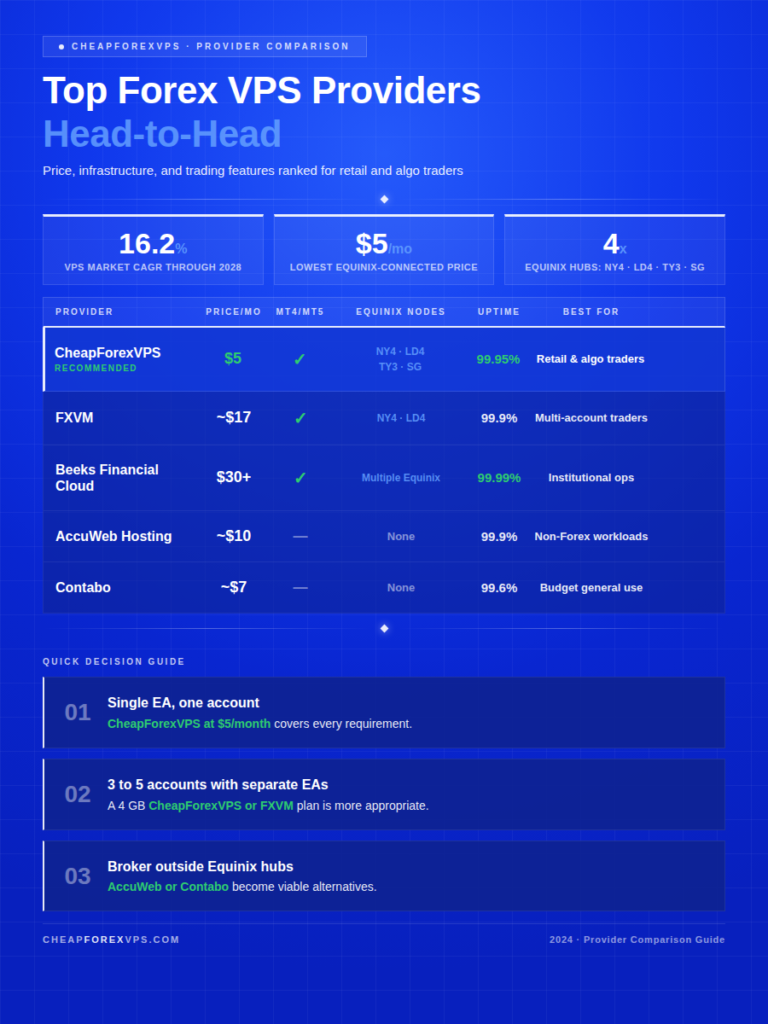
How Do the Top Forex VPS Providers Compare Head-to-Head?
CheapForexVPS delivers the strongest combination of price, data center quality, and trading-specific features for retail traders. FXVM leads for traders who need more guaranteed resources. Beeks is the institutional tier.
The global VPS market is projected to grow at a 16.2% CAGR through 2028, according to Statista, driven largely by the expansion of retail algorithmic trading. As EA adoption increases, the performance gap between specialized and generic hosting compounds across every additional trade.
| Provider | Price | MT4/MT5 Pre-Installed | Equinix Co-Location | Uptime | Money-Back | Best For |
| CheapForexVPS | $5/month | Yes | NY4, LD4, TY3, SG | 99.95% | 5 days | Retail and algo traders |
| FXVM | ~$17/month | Yes | NY4, LD4 | 99.9% | Varies | Multi-account traders |
| Beeks Financial Cloud | $30+/month | Yes | Multiple Equinix | 99.99% | No | Institutional operations |
| AccuWeb Hosting | ~$10/month | No | No | 99.9% | 30 days | Non-Forex workloads |
| Contabo | ~$7/month | No | No | 99.6% | No | Budget general use |
Quick decision guide:
- Single EA, one account: CheapForexVPS at $5/month covers every requirement.
- 3 to 5 accounts with separate EAs: A 4 GB CheapForexVPS or FXVM plan is more appropriate.
- Broker outside Equinix hubs: AccuWeb or Contabo become viable alternatives.
What Server Location Should You Choose for Your Forex VPS?
Choose the data center location closest to your broker’s matching engine. Your home location is irrelevant.
The network distance between your VPS and your broker’s server determines fill quality. A VPS in London with a 2ms ping to your broker outperforms a VPS in your home country with a 120ms ping on every single trade.
A Cloudscene market analysis identifies London and New York as the two largest global financial data center markets, with Singapore and Tokyo as the primary Asian hubs.
| Broker | Primary Server Location | Recommended VPS Location |
| IC Markets | Equinix NY4, LD4 | NY4 or LD4 |
| Pepperstone | Equinix NY4, LD4 | NY4 or LD4 |
| OANDA | Equinix NY4 | NY4 |
| XM | Equinix NY4 | NY4 |
| Exness | LD4 | LD4 |
| FP Markets | Equinix NY4, LD4 | NY4 or LD4 |
| Vantage | Equinix NY4, LD4 | NY4 or LD4 |
| FTMO (prop firm) | LD4 | LD4 |
If your broker is not listed, follow these steps:
- Open MetaTrader and go to Help > About.
- Note the server address shown.
- Run ping [server address] from two or three VPS locations during a free trial.
- Select the location that returns the lowest millisecond result.
What Hardware Specs Does a Forex VPS Actually Need?
The minimum viable specification for a single MetaTrader instance with one or two EAs is 1 CPU core, 2 GB of RAM, and SSD storage.
The most common cause of EA freezes and missed signals on a VPS is insufficient RAM, not insufficient CPU. The specifications below reflect real-world trading workloads, not marketing estimates.
RAM: The Variable That Actually Limits Performance
Each MetaTrader 4 or 5 instance uses approximately 500 MB to 1 GB of RAM under active trading conditions.
| Configuration | RAM Required |
| 1 MT4/MT5 instance, 1 to 2 EAs | 2 GB |
| 2 instances with separate EAs | 2 to 3 GB |
| 3 instances or strategy scanner running | 4 GB+ |
| Real-time news feeds or 4+ instances | 6 GB+ |
Running four MetaTrader instances on a 2 GB plan causes consistent platform freezes, degraded order routing, and crashes during high-volatility sessions.
Storage Type: SSD Is Non-Negotiable
MetaTrader writes tick data, log files, and historical price records continuously during market hours. SSD storage delivers up to 100 times faster read/write access than hard disk drives. This prevents disk I/O from bottlenecking performance when data activity spikes during news events or EA signal generation.
Operating System and Licensing
MetaTrader 4 and MT5 are both designed natively for Windows. Confirm the Windows Server license is bundled into the plan price before purchasing. Several general-purpose providers exclude the OS license from the listed price, adding $10 to $20 per month in unlisted fees.
| Use Case | RAM | CPU Cores | Storage | Est. Monthly Cost |
| 1 EA, 1 account | 2 GB | 1 core | SSD 30 GB+ | From $5 |
| 2 to 3 EAs, multiple accounts | 4 GB | 2 cores | SSD 60 GB+ | $10 to $20 |
| 5+ EAs or backtesting alongside live trading | 8 GB | 4 cores | SSD 100 GB+ | $25 to $50 |
| Institutional, HFT, or multi-strategy | 16 GB+ | 8 cores | NVMe SSD | $80+ |
How Do You Match a Forex VPS Plan to Your Trading Style?
Select your plan based on the number of MetaTrader instances you intend to run simultaneously, then verify with Task Manager during the first 48 hours before committing to live capital.
Forrester research found that workload-matched infrastructure improves operational efficiency by 15 to 20% compared to general-purpose alternatives. A VPS running at 90% RAM capacity during a London open spike introduces the same execution risk as a server with poor latency.
| Trader Profile | RAM Needed | Key Priority | Est. Cost |
| Manual trader, overnight positions | 1 to 2 GB | Uptime | From $5 |
| Single-EA algo trader | 2 GB | Latency to broker | From $5 |
| Multi-account portfolio (3 to 5 accounts) | 4 GB | Resource headroom | $10 to $20 |
| Strategy developer (live + backtesting) | 8 GB | CPU and RAM headroom | $25 to $50 |
| Prop firm evaluation trader | 2 to 4 GB | Data center proximity | From $5 |
Additional notes by profile:
- Single-EA trader: The CheapForexVPS $5 entry plan is sized for this use case, with headroom for one additional instance if needed.
- Strategy developer: Do not run backtests while live positions are open on the same plan. Monitor CPU utilization during optimization runs.
- Prop firm trader: Prioritize the data center closest to your prop firm’s broker above all other factors. Use the 5-day money-back guarantee to validate latency before your evaluation begins.
Confirm your provider supports in-place RAM and CPU upgrades. Migrating to a larger server mid-campaign means reinstalling MetaTrader and reconfiguring all EAs.
How Do You Verify Your Forex VPS Performance Before Going Live?
Run a ping test to your broker’s server within the first 30 minutes of access. Do not deploy live capital until that test confirms a result under 10ms.
Ookla’s Global Index shows that financial data center uplinks consistently outperform residential connections by orders of magnitude. This test confirms your specific server is delivering the execution environment you paid for.
| Test | How to Run It | Target | Action if Failed |
| Latency to broker server | Command Prompt: ping [broker server address] | Under 10ms | Contact provider or switch location |
| RAM usage under load | Task Manager > Performance tab, EAs active | Below 75% | Upgrade plan before going live |
| Uplink speed | Speedtest.net from inside the VPS | 1 Gbps minimum | Request a different node from provider |
| Platform stability | Run MT4/MT5 for 24 hours, no live trades | Zero freezes or disconnections | Check EA memory usage |
| RDP reconnection | Disconnect and reconnect from a different device | Under 5 seconds | Check local firewall settings |
Interpreting your ping result:
- Under 10ms: Acceptable for most strategies.
- 10ms to 50ms: Borderline. Investigate data center location before going live.
- Above 50ms: Wrong region. Switch VPS location before deploying capital.
Where to Buy Affordable Forex VPS Hosting: Final Recommendations
For most retail traders running one to five EAs, the decision is straightforward. A specialized Forex VPS from CheapForexVPS costs $5 a month. It includes MetaTrader pre-installed on Windows Server, a 99.95% uptime guarantee, and servers inside the same Equinix data centers where your broker’s matching engine operates. That is not available from Contabo or AccuWeb at any price.
FXVM is the logical next step when you outgrow an entry-level plan and need guaranteed dedicated resources across multiple accounts. Beeks Financial Cloud addresses institutional requirements that are out of scope for most individual traders.
| Your Situation | Recommended Provider |
| Single EA, one account | CheapForexVPS ($5/month) |
| Multiple accounts, need more RAM | CheapForexVPS 4 GB plan or FXVM |
| Institutional or fund operations | Beeks Financial Cloud |
| Broker outside Equinix hubs | AccuWeb Hosting |
| General Windows server, not for trading | Contabo |
Start with the smallest plan that covers your MetaTrader instance count. Upgrade only when your resource monitor shows consistent usage above 75%.
Explore Forex-specific plans with Equinix co-location and MetaTrader pre-installed at CheapForexVPS.
Frequently Asked Questions About Affordable Forex VPS Hosting
Is CheapForexVPS better than Contabo for Forex trading?
Yes. CheapForexVPS servers sit inside Equinix financial data centers alongside broker matching engines, with MetaTrader pre-installed. Contabo offers more raw specs for the price but lacks financial hub co-location and trading-specific support, resulting in significantly higher latency to most retail brokers.
How do I find out which data center my broker uses?
Open MetaTrader, go to Help > About, and note the server address. Run ping [server address] from two or three VPS locations during a free trial and pick the one with the lowest result. Most major retail brokers use Equinix NY4 or LD4.
Can I use a Forex VPS for prop firm trading?
Yes, and it is strongly recommended. Prop evaluations penalize platform downtime and execution inconsistency, both of which a home internet connection introduces. Use the CheapForexVPS 5-day money-back guarantee to verify latency is under 10ms before your evaluation starts.
What happens to my open trades if my VPS goes offline?
Your broker holds all open positions on their server regardless of your VPS status. The positions stay open, but your EA loses the ability to monitor or close them. A 99.95% uptime guarantee limits unplanned downtime to under 4.4 hours per year.
Do I need a separate VPS for each broker account?
No. One VPS runs multiple MetaTrader instances simultaneously, each connected to a different broker account. The limit is RAM: two instances on 2 GB, three to five on 4 GB, and more than five requires 8 GB or a dedicated resource plan.
Is $5 a month enough for a real Forex VPS?
Yes, for a single EA on one account. A $5 CheapForexVPS plan includes 2 GB RAM, SSD storage, Windows Server, MT4 and MT5 pre-installed, and Equinix data center access. It is not adequate for three or more simultaneous MetaTrader instances.